Skip to content
Plumrocket
  1. Magento 2 Extensions
  2. Magento 1 Extensions
  3. Services
    • Magento (Adobe Commerce)
      • Magento Speed Optimization
      • Hyvä Theme Development
        Top
      • Magento 1 to Magento 2 Migration
        Top
      • Magento Upgrade
        Top
      • Magento AMP Development
      • Magento Extension Installation
      • Hire Magento Developers
      • Magento Development
      • View All Magento Services
    • Shopify
      • Shopify Development
        Top
      • Magento to Shopify Migration
    • Salesforce
      • Salesforce Development
      • Magento Salesforce Integration
    • CMS
      • Wix Development
        New
      • Squarespace Development
        New
    • Ecommerce
      • Catalog Management
    • banner icon
      Looking for custom solutions for your business? We've got you covered.
      Start a project arrow right
  4. Resources
    • Blog Insights, trends, and best practices in eCommerce and web development.
    • FAQ Answers to common questions about our services and solutions.
    • Tutorials Step-by-step instructions to streamline your development process.
    • Documentation Detailed guides on our Magento extensions and integrations.
    • Customer Stories Real-world case studies showcasing our clients’ achievements.
  5. Special offers
  6. Contact Us
  • Contact Us

Home Magento 2 Extensions Magento 2 Social Login Pro Documentation Integrations Imgur Login Configuration

    • Installation
    • Updating
    • Configuration
      • Facebook Login Magento Configuration
      • Twitter Login Magento Configuration
      • Google Login Magento Configuration
      • Google One Tap Sign In Magento Configuration
      • LinkedIn Login Magento Configuration
      • Yahoo! Login Magento Configuration
      • Live, Hotmail, MSN Login Magento Configuration
      • Amazon Login Magento Configuration
      • Aol Login Magento Configuration
      • GitHub Login Magento Configuration
      • Instagram Login Magento Configuration
      • Foursquare Login Magento Configuration
      • Dropbox Login Magento Configuration
      • Disqus Login Magento Configuration
      • Livejournal Login Magento Configuration
      • Tumblr Login Magento Configuration
      • Flickr Login Magento Configuration
      • WordPress Login Magento Configuration
      • PayPal Login Magento Configuration
      • Salesforce Login Magento Configuration
      • Evernote Login Magento Configuration
      • Stackoverflow Login Magento Configuration
      • Mixi Login Magento Configuration
      • QQ Login Magento Configuration
      • Sina Weibo Magento Configuration
      • Kaixin001 Login Magento Configuration
      • Renren Login Magento Configuration
      • Alipay Login Magento Configuration
      • WeChat Login Magento Configuration
      • Mydigipass Login Magento Configuration
      • SoundCloud Login Magento Configuration
      • Verisign Login Magento Configuration
      • XING Login Magento Configuration
      • PersonaBrowserID Login Magento Configuration
      • Bitbucket Login Magento Configuration
      • Skyrock Login Magento Configuration
      • Bitly Login Magento Configuration
      • Box.com Login Magento Configuration
      • Vimeo Login Magento Configuration
      • Reddit Login Magento Configuration
      • Upwork Login Magento Configuration
      • TeamViewer Login Magento Configuration
      • Etsy Login Magento Configuration
      • Imgur Login Magento Configuration
      • Intuit Login Magento Configuration
      • MailChimp Login Magento Configuration
      • Dribbble Login Magento Configuration
      • Goodreads Login Magento Configuration
      • Last.fm Login Magento Configuration
      • Naver Login Magento Configuration
      • Line Login Magento Configuration
      • Apple Login Magento Configuration
      • Steam Login Magento Configuration
      • Yahoo! Japan Login Magento Configuration
      • Telegram Login Magento Configuration
      • TikTok Login Magento Configuration
      • Spotify Login Magento Configuration
      • Slack Login Magento Configuration
      Integrations
    • How-To Guides
    • Troubleshooting
    • Developer Guide & API Reference
    • Translation
    • Uninstalling
    Magento 2 Social Login Pro - Documentation

How to Add Magento Imgur Login to Your Website

How to Set Up Imgur API for Magento

In this article, you will learn how to enable and configure your Imgur API in order to integrate Imgur login into Magento Social Login Pro extension. Please follow the step-by-step instructions below.

Step-by-Step action:

  1. Log into api.imgur.com/oauth2/addclient.
  2. Indicate the name of your Imgur application.
  3. Select your Authorization type to be “OAuth 2 authorization with a callback URL”.
  4. Copy and Paste Authorization Callback URL, that can be found in your Magento backend-> Plumrocket-> Social Login Pro-> Imgur-> Authorization Callback URL. Note: Please make sure your site has SSL enabled as “https” protocol is required for this network.
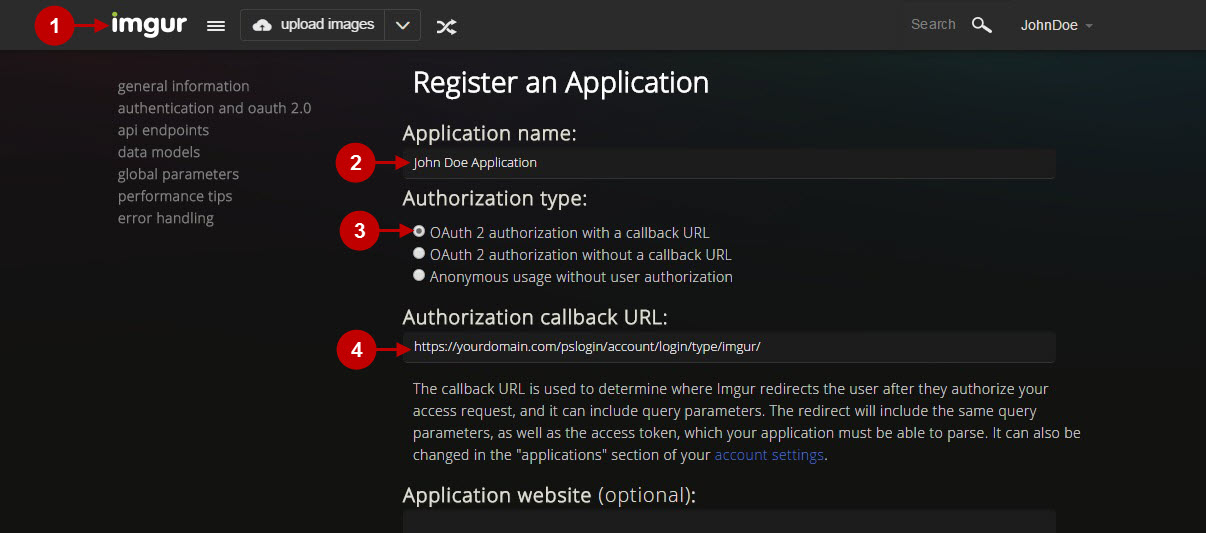
Magento social login pro imgur conf1.jpg

Step-by-Step action:

  1. Enter your Email.
  2. Provide short description of your application.
  3. Input captcha password.
  4. Press “Submit” button to create your Imgur application.
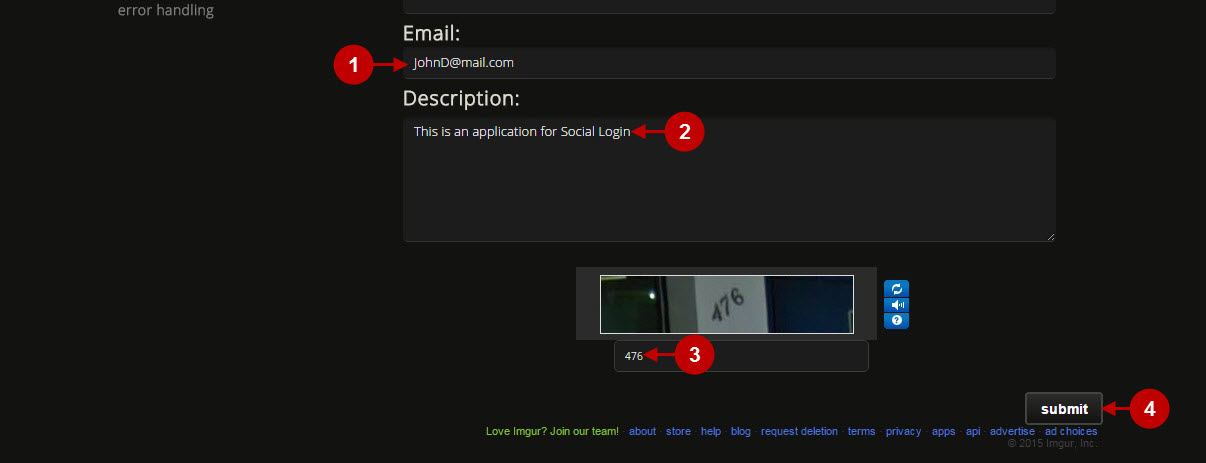
magento imgur quick login extension

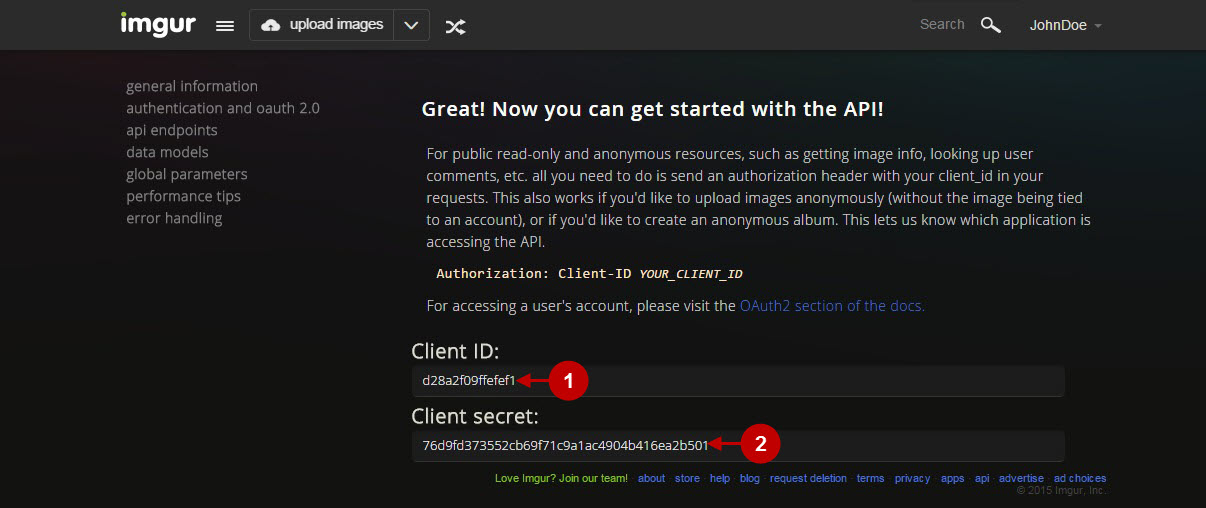
Step-by-Step action:

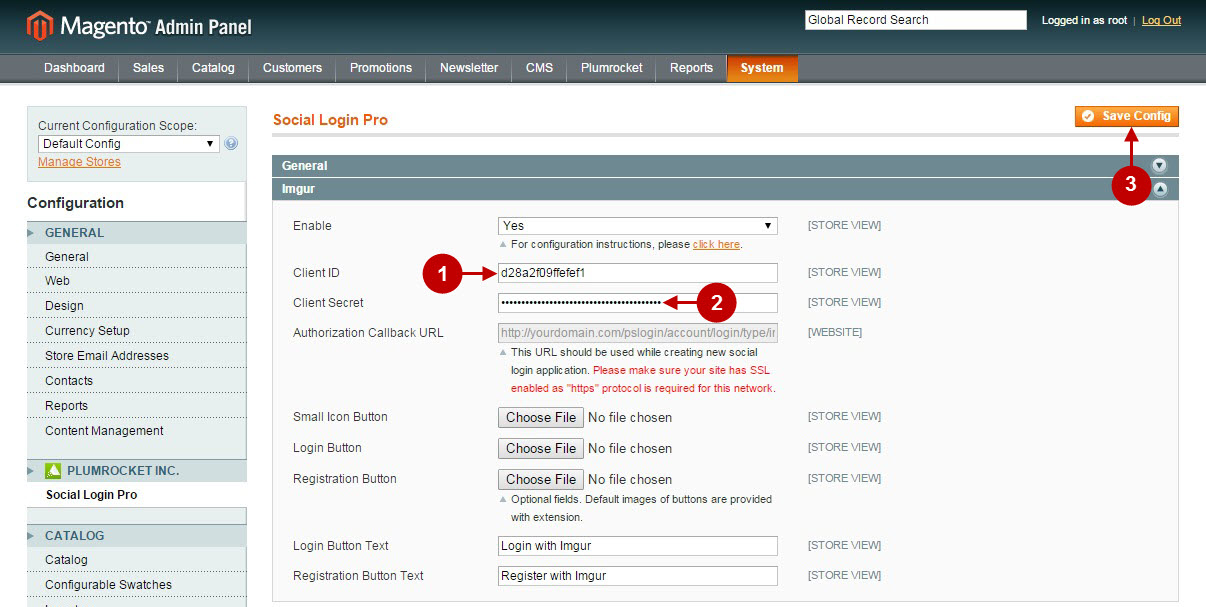
  1. Copy “Client ID” to your clipboard.
  2. Copy “Client Secret” to your clipboard.
Magento social login pro imgur conf3.jpg

Configuring Imgur Integration in Magento Social Login Pro Extension

In this step you must update your Magento Social Login Pro Extension configuration. In your magento admin panel, go to “System” -> “Configuration” -> “Plumrocket Inc” -> “Social Login Pro” -> “Imgur” Tab.

Step-by-Step action:

  1. Paste Client ID into the relevant field of your “Imgur” backend tab.
  2. Insert Client Secret into the relevant field of your “Imgur” backend tab.
  3. Press “Save Config” button.
Magento social login pro imgur conf4.jpg

Configuration of Imgur Magento Social Login application is now completed.

Configuring Imgur Integration in Magento2 Social Login Pro Extension

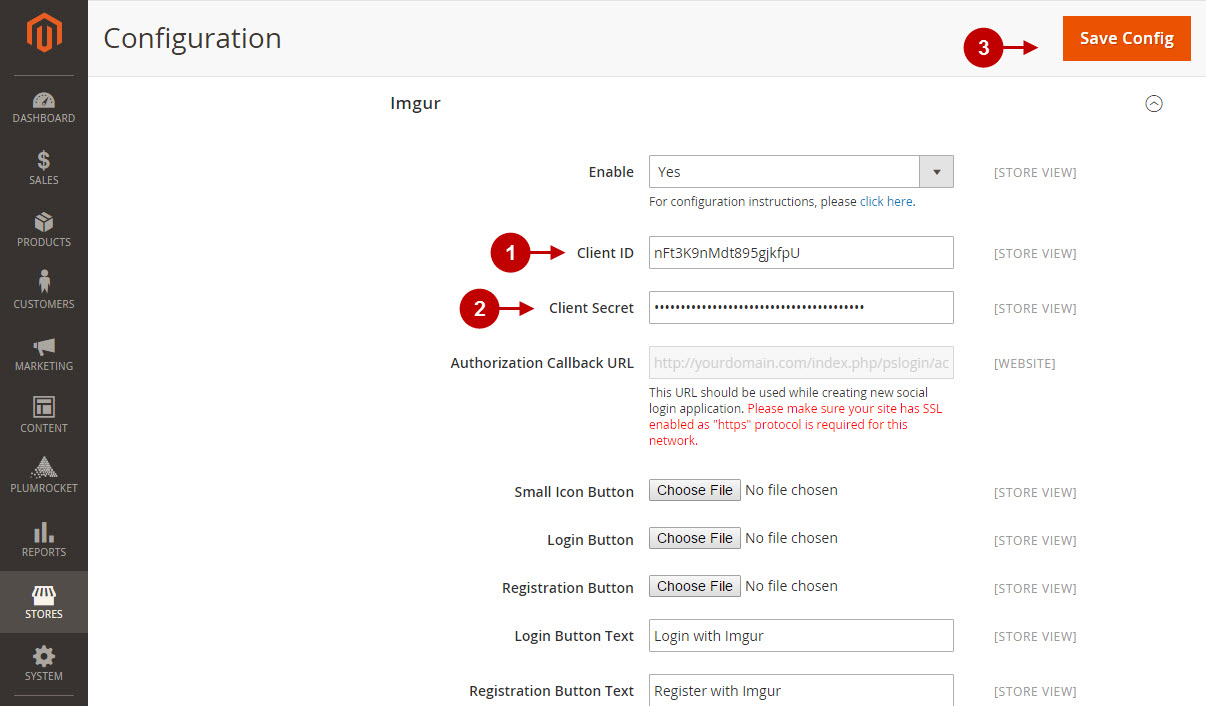
In this step you must update your Magento 2 Social Login Pro Extension configuration.In your magento 2 admin panel, go to “Plumrocket” tab in the main menu -> “Social Login Pro” section -> “Configuration” -> “Imgur” Tab.

Step-by-Step action:

  1. Paste Client ID into the relevant field of your “Imgur” backend tab.
  2. Insert Client Secret into the relevant field of your “Imgur” backend tab.
  3. Press “Save Config” button.
43 Magento 2 Imgur Login Configuration v1.jpg

Configuration of Imgur Magento 2 Social Login application is now completed.

Next Step > Return to Social Login Pro API Reference

Was this article helpful?
02/28/202009/28/2021
Search
Search
Generic selectors
Exact matches only
Search in title
Search in content
Contents
Trustpilot
Clutch
Adobe Certified Professional
Adobe Marketplace
Company
  • Home
  • About Plumrocket Inc.
  • Customer Stories
  • Programs & Promotions
  • Careers
  • Contact Us
Legal
  • Terms of Service
  • Privacy Policy
  • Refund Policy
  • Cookie Policy
  • Support Policy
  • Privacy Center
Resources
  • Blog
  • FAQ
  • Documentation
  • Tutorials
Partners
  • Partner Program
  • Affiliate Program
  • Official Partners
Plumrocket Inc. © 2008 - 2026