Connect new account
✕If you have multiple social networks accounts (like Facebook, Twitter, Google) - you can link your social accounts with your account at our store. This will allow you to access the website more conveniently!

You have no items in your shopping cart.

Magento 2 Google Shopping Feed extension allows you to quickly create product feeds for Google Shopping Ads and promote your products across different channels. Increase sales and brand awareness by running affiliate campaigns with automation tools like this and expanding your reach.

| Product Details | |
| Version: | 2.8.0 (Jul 21, 2026) |
| Documentation: | User Guide |
| Live Demo: | View |
| Code Visibility: | 100% Open Code |
| Supported CE - EE: |
CE 2.3.x - 2.4.9 EE 2.3.x - 2.4.9 |
| License: | Single Magento Installation |
| Free Updates & Support: |
1 year (Details)
No subscriptions |
| Refund Policy: | 60 Days (View) |
Advertising your Magento 2 products across multiple marketplaces, networks, and engines will bring you more customers, brand recognition and business growth. Our Magento 2 Google Shopping Feed extension allows you to connect to Google Shopping Ads (Google Merchant Center and other Google services), Facebook, AWIN, and other platforms while automating the data feed management (see the full list of integrations below).
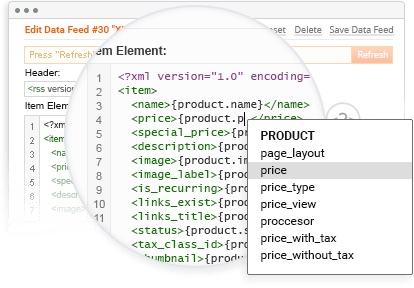
The extension provides ready-made product feed templates that fully comply with the platforms’ requirements and allow you to generate your feeds in a few clicks. Additionally, you can customize them or create them from scratch by using over 50 supported visual tags.
Moreover, you don’t need to worry about generating new feeds once you’ve changed some product information on your Magento 2 store - just schedule automatic feed updates and always offer relevant information for your customers across the platforms.

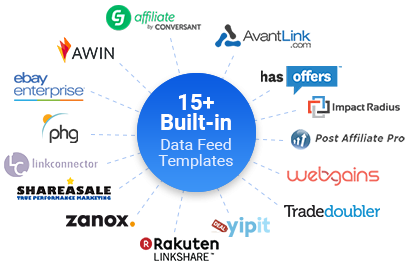


 Magento 2 eBay Data Feed(www.ebay.com)
 Magento 2 AvantLink Data Feed(avantlink.com)
 Magento 2 CJ Affiliate Data Feed(cj.com)
 Magento 2 Pepperjam Network(pepperjamnetwork.com)
 Magento 2 Tune Data Feed(tune.com, formerly HasOffers)
 Magento 2 Impact Data Feed(impact.com)
 Magento 2 Linkconnector Data Feed(linkconnector.com)
 Magento 2 Partnerize Data Feed(partnerize.com)
 Magento 2 Post Affiliate Pro Data Feed(postaffiliatepro.com)
 Magento 2 YipitData Data Feed(yipitdata.com)
 Magento 2 Webgains Data Feed(webgains.com)
Need more data feeds? Please submit your request
 Write a Review
Every customer will automatically receive
$10 in reward points for each approved review.
You can manually download the data feed file using the link generated by the extension. Otherwise, you can use the FTP upload option to do it automatically for platforms like Google Merchant Center.
Learn moreThe extension lets you add, edit or delete columns in the data feed template from the Magento backend. Please make sure the data is entered in the correct format.
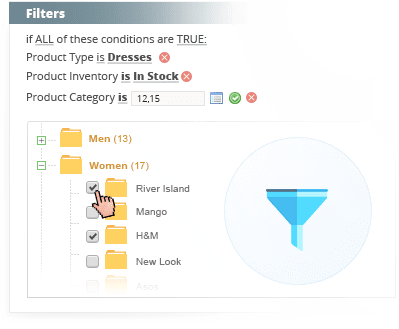
Yes. You can include or exclude products and categories using flexible feed filters. This helps you create targeted product feeds in Magento 2 for specific campaigns, product groups, stores, or languages.
Yes. It generates a product feed in OpenAI's required format, which you upload to ChatGPT Ads Manager via SFTP to run product-feed campaigns. The Magento 2 Shopping Feed extension handles feed creation and automatic updates; campaign setup happens on OpenAI's side.
The extension includes ready templates for major affiliate networks including Awin, Rakuten, ShareASale, Webgains, and TradeDoubler. It also covers shopping and advertising channels like Google Merchant Center, Facebook, Bing Shopping, eBay, and a ChatGPT Ads feed template. For anything not pre-built, you can create a custom template using the tag editor.
Yes. Feed caching and scheduled cron generation are built for stores with thousands of products, multiple store views, and multiple languages, so regeneration does not choke on catalog size.
No. Templates and the visual editor cover most setups without code. Developers who want full control can use the tag system and custom templates.
There are several ways to set up automatic updates for the Facebook data feed. Learn about the quickest and most effective method to bulk upload your Magento 2 store products.
Learn moreThe Magento 2 Data Feed supports multiple feed formats, including RSS, XML, JSON, and CSV.
Yes, the Data Feed extension by Plumrocket provides SFTP connection details for uploading and validating the feed.
No, not currently. Products from the feed are eligible for ads, not organic ChatGPT shopping results or normal ChatGPT conversations. OpenAI has said organic use may come later.
Version 2.8.0 Jul 21, 2026
Version 2.7.4 Jun 22, 2026
Version 2.7.3 Jun 05, 2026
Version 2.7.2 May 02, 2026
Version 2.7.1 Dec 11, 2025






 Magento 2 Google Merchant Center
 Magento 2 Awin Data Feed
  Magento 2 Facebook Data Feed
  Magento 2 ChatGPT Data Feed
 Magento 2 Bing Shopping Feed
  Magento 2 Rakuten Data Feed
 Magento 2 ShareASale Data Feed
 Magento 2 TradeDoubler Data Feed