

According to the Baymard Institute, forced account creation is one of the top reasons shoppers abandon their carts — accounting for roughly 24% of all checkout drop-offs. That is a significant amount of lost revenue, and the fix is simpler than you might think.
One of the simplest ways to reduce this friction is to enable guest checkout, allowing customers to complete purchases without creating an account.
In this guide, you will learn how to enable or disable guest checkout in Magento 2, configure the post-checkout experience, and choose the right setup for your store.
However, if your goal is to increase registered checkouts without adding friction, you can streamline the account creation process after purchase. Plumrocket Social Login Pro extension does exactly that, enabling one-click sign-up via Google, Facebook, or Apple so customers never have to create a password to get an account.
What Is Guest Checkout in Magento 2?
Magento guest checkout is a native feature that lets customers place an order without creating or logging into an account. Instead of filling out a registration form before purchasing, shoppers provide only the information needed to complete the order — their name, shipping address, and payment details — and move on.
After the order is placed, Magento gives customers the option to create an account using the email address they already entered. This means store owners do not have to choose between conversion rates and customer data — they can pursue both.
Understanding guest checkout in Magento 2 is essential for any store owner making decisions about the checkout flow. The configuration is straightforward, but its impact on conversion rates, customer data, and long-term retention is significant.
Pros and Cons of Magento Guest Checkout
Whether to allow guest checkout in Magento 2 or enforce registration is not a one-size-fits-all decision. Here is an honest breakdown of the trade-offs.
| ✅ Pros | ❌ Cons |
| ✔ Reduces cart abandonment | ✘ Limited customer data for marketing |
| ✔ Faster, frictionless path to purchase | ✘ Harder to encourage repeat purchases |
| ✔ Addresses privacy concerns | ✘ Guest orders are harder to manage in admin |
| ✔ Higher conversion rates, especially on mobile | ✘ Customers can’t track orders or reorder easily |
How to Enable or Disable Guest Checkout in Magento 2
To allow or disable guest checkout in Magento 2, follow the steps below. The setting is located in the Sales configuration area of the Admin Panel.
Enable or Disable Guest Checkout in Magento 2:
- In your Magento Admin Panel, go to Stores → Settings → Configuration.
- Open Sales → Checkout, then expand the Checkout Options section.
- Find Allow Guest Checkout and set it to Yes. If the field is disabled, uncheck Use system value first.
- Click Save Config, then go to System → Cache Management and click Flush Magento Cache to apply the changes on the storefront.
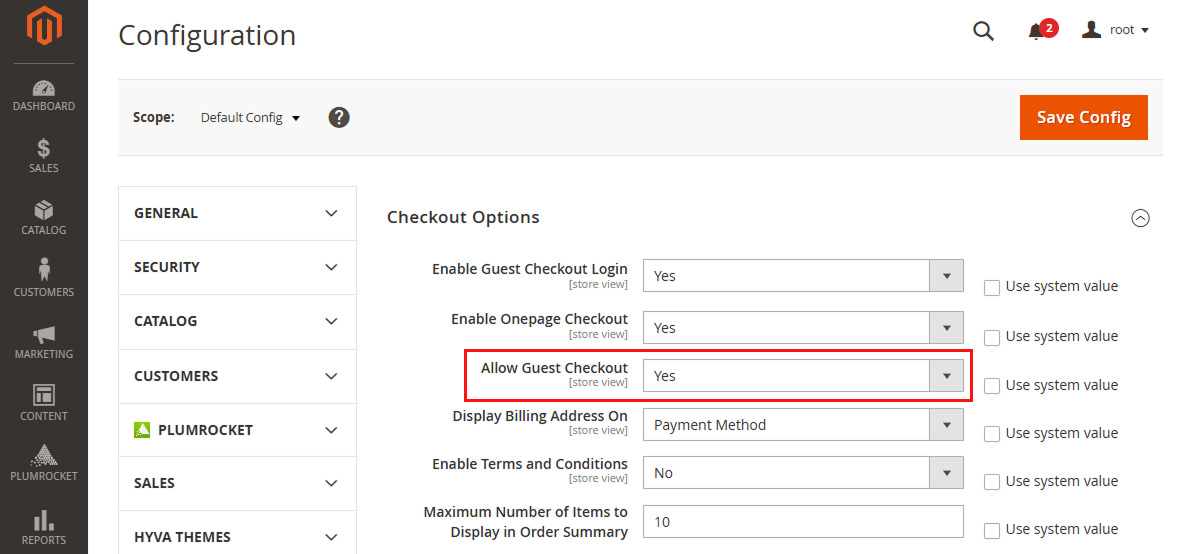
Once guest checkout is enabled, consider optimizing the post-checkout experience so guest users can easily return later or convert into registered customers. The easiest and smartest way is to use the Checkout Success Page Extension for Magento.
Should You Enable or Disable Guest Checkout?
If you are unsure whether to enable guest checkout in Magento 2 or restrict it, use this framework based on your store type and business model.
| Store Type | Recommended Setting | Reason |
| B2C / General retail | Enable guest checkout | Reduce friction; maximize conversions |
| B2B / Wholesale | Disable guest checkout | Account needed for pricing, quoting, credit |
| Subscription-based | Disable guest checkout | Account required to manage subscriptions |
| Loyalty-first brands | Enable + post-checkout prompt | Best of both worlds |
| High-volume flash sales | Enable guest checkout | Speed is everything; remove all barriers |
| Membership / gated stores | Disable guest checkout | Registration is core to the model |
For the vast majority of B2C Magento stores, the recommendation is clear: allow guest checkout in Magento 2. The conversion benefits outweigh the data limitations, especially when you have a post-checkout strategy to convert guests into registered customers.
Conclusion
Enabling guest checkout in Magento 2 is one of the most impactful, lowest-effort optimizations available to any store owner. The configuration takes less than five minutes, and the potential uplift in conversion rate — particularly for stores that currently enforce registration — can be substantial.
But the real opportunity lies in what you do after the order is placed. The checkout success page is where most stores leave significant value on the table. By customizing it to include a frictionless account creation prompt — and pairing it with social login — you can build a growing registered customer base without sacrificing the conversion benefits of Magento 2 guest checkout.
Frequently Asked Questions (FAQ)
Is guest checkout enabled by default in Magento 2?
Yes. In a fresh Magento 2 installation, guest checkout is enabled by default. The Allow Guest Checkout setting is set to Yes out of the box.
Can a guest customer track their order in Magento 2?
Yes. Magento 2 provides an “Orders and Returns” page accessible from the storefront footer. Guest customers can enter their order ID, billing last name, and email address (or ZIP code) to view their order status — no account required.
How do I automatically create an account for guest buyers?
Magento 2 does not automatically create accounts for guest buyers by default — it only displays a post-checkout prompt. True Magento guest checkout auto create account behavior requires either a custom development or an extension. Options include dedicated guest-to-customer conversion extensions or configuring the checkout success page with a one-click social login option that feels equally seamless.
