

If you run a Magento 2 store, you know that standing out in search results is critical. One of the most effective ways to do this is by using structured data. These snippets — star ratings, prices, reviews, breadcrumbs, and more — make your product listings more visually appealing in Google search results and can boost click-through rates.
Structured data, also known as schema markup, tells search engines exactly what your pages contain. Beyond improving search visibility, properly implemented rich snippets can also enhance your store’s AI-driven visibility optimization, making your products easier for AI to understand and recommend.
In this guide, we’ll show you how to add rich snippets in Magento 2 efficiently, either manually or via a structured data extension.
How Structured Data Works
When a shopper visits your store, they understand your pages intuitively — they see a product photo, read a price, check the reviews. Search engines don’t work that way. Google crawls raw HTML, and raw HTML doesn’t come with labels. A number on a page could be a price, a product code, a date, or a phone number. Google has to guess — and guessing means it sometimes misses information that could be working in your favor.
Structured data solves this by adding an invisible layer to your pages written specifically for search engines. It states explicitly: this is a price, this is a product name, this rating comes from 86 reviews. No guessing required.
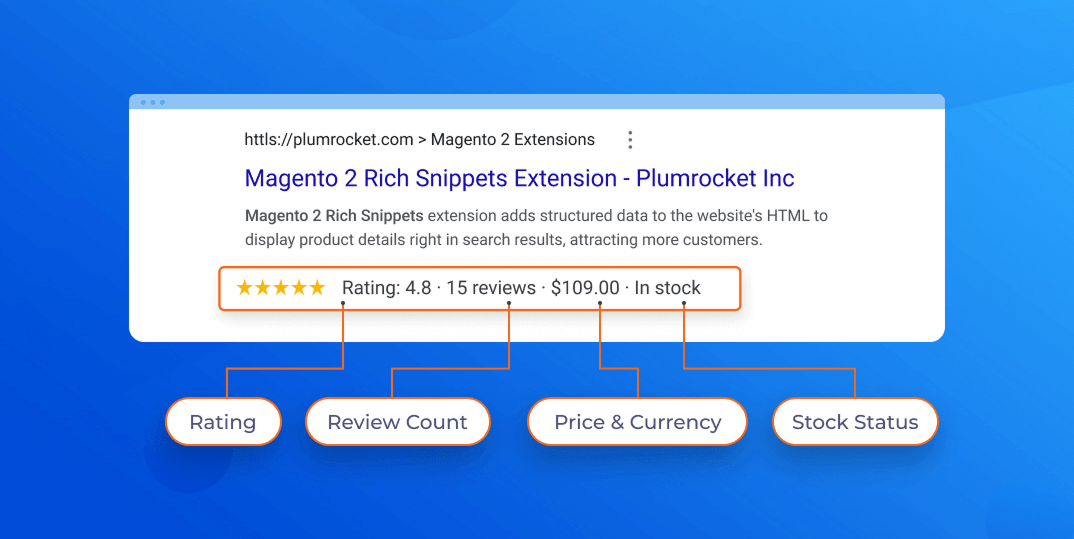
How It Flows, From Your Store to Search Results
1. A structured data block is embedded in your page code. It’s invisible to shoppers but readable by every search engine. It describes your page content using Schema.org — a shared vocabulary created by Google, Bing, Yahoo, and Yandex so that all search engines interpret the same markup the same way.
2. Google crawls the page and reads the structured data. It now knows exactly what type of page this is, what the product is called, what it costs, whether it’s in stock, and what shoppers think of it.
3. Google uses that information in two ways. First, it enriches your search listings with rich snippets — prices, star ratings, breadcrumbs visible in results before a shopper clicks. Second, it uses it to better understand your store — influencing your eligibility for Google Shopping carousels, product panels, and brand Knowledge Panels.
How Rich Snippets Are Typically Added to a Website
Before diving into the Magento-specific setup, it helps to understand the three standard ways structured data gets added to any website. This gives you a clearer picture of why the extension approach is the right choice for a Magento store.
Option 1: Manual JSON-LD Code
The most direct method — and Google’s officially recommended approach — is adding a JSON-LD script block manually to each page’s <head> section.
How it works: A developer writes a structured data block for each page type (product page, category page, homepage) and either hardcodes the values or pulls them dynamically from your database.
The catch: Every page type needs its own schema. Product data like price, availability, and reviews has to stay in sync manually. Any schema update requires a developer. For a store with hundreds of products this becomes expensive and error-prone very quickly.
Best for: Small static websites or single landing pages where schema rarely changes.
Option 2: Google Tag Manager
Google Tag Manager lets you inject structured data into pages without touching your codebase — appealing if you want to avoid developer involvement.
How it works: You create a custom HTML tag in GTM containing your JSON-LD block and fire it on the pages you need.
The catch: GTM loads after the page renders, meaning structured data isn’t always present when crawlers first read the page. For simple schemas like organization info this is usually fine. For product pages where price and availability need to be accurate and crawlable in real time, it’s unreliable.
Best for: Non-ecommerce pages, or adding simple one-off schemas like FAQ blocks to specific pages.
Option 3: A Dedicated Extension
A purpose-built extension handles structured data generation automatically — no manual coding, no GTM workarounds.
How it works: The extension hooks into your Magento catalog and generates complete, server-rendered JSON-LD for every page type automatically. Product data — price, stock status, reviews, brand — is pulled live from your database every time the page loads.
Why it’s the right choice for Magento: Your catalog changes constantly. Prices update, products go out of stock, new reviews come in. A dedicated extension keeps your structured data perfectly in sync without any manual effort. It also covers all schema types — product, organization, breadcrumbs, sitelinks — in one place, configured entirely from the admin panel.This is exactly what the Plumrocket Rich Snippets extension does. The rest of this guide walks you through setting it up.
How to Add Structured Data with Magento 2 Extension
To start adding rich snippets to your Magento website, install Rich Snippets extension.
Product Information
The extension pulls core product information such as:
- product name
- description
- SKU
- brand
Most stores use the default attributes for these fields, but if your catalog stores brand or product descriptions in custom attributes, you can map those attributes in the configuration.
If your catalog contains global product identifiers like GTIN or MPN, you can also map them here. These identifiers help search engines match your products with listings across the web and are particularly valuable for Google Shopping.

Pricing and Availability
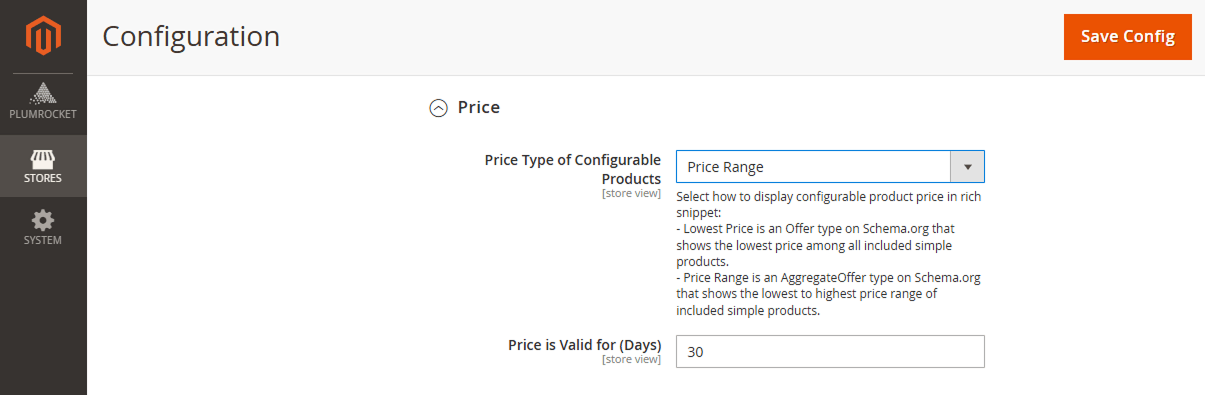
Structured data also communicates price and stock status, two of the most visible rich snippet elements in search results. For simple products, the extension automatically adds the current price and availability. Configurable products require an additional choice because different variations may have different prices.
You can choose whether the structured data should display:
- the lowest available price, or
- a price range representing the variation in prices.
Ratings and Reviews
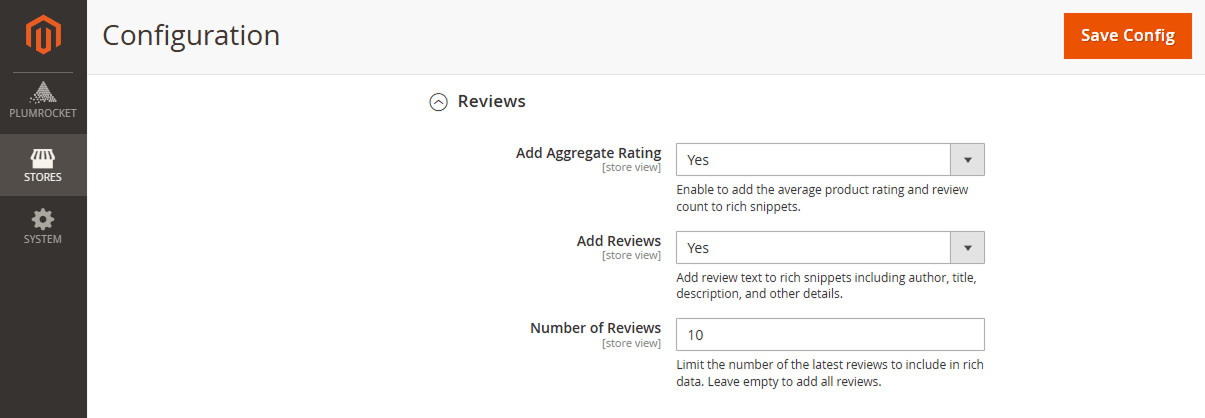
Ratings are one of the most powerful rich snippets because they add visible star ratings to search results. When enabled, the extension includes an aggregate rating in your product schema. This tells search engines the average rating for the product and the total number of reviews it has received.
You can also include individual reviews within the structured data. Adding a limited number of recent reviews helps provide more context to search engines while keeping the markup lightweight and efficient.
Configure Breadcrumb
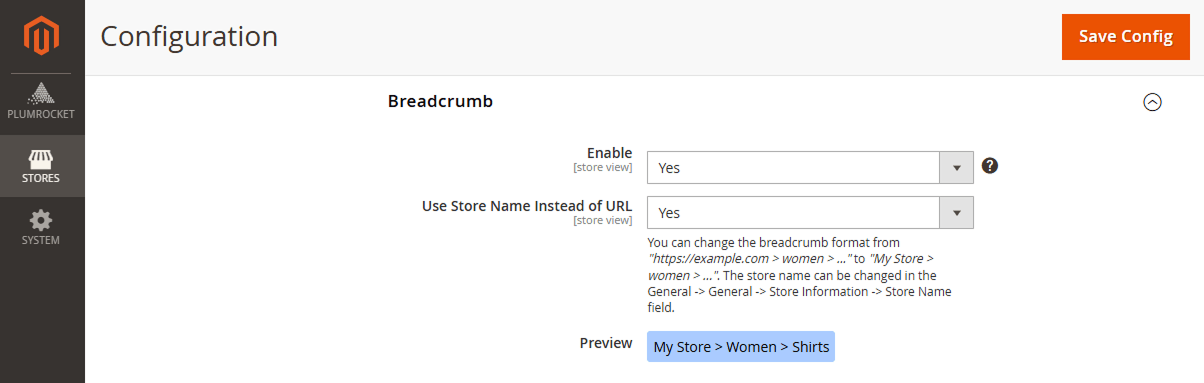
Breadcrumb schema helps search engines understand your website’s hierarchy. Instead of showing a full URL in search results, Google may display a breadcrumb trail such as:
Home → Category → Product
Once enabled, the extension automatically generates breadcrumb structured data based on your Magento category structure.
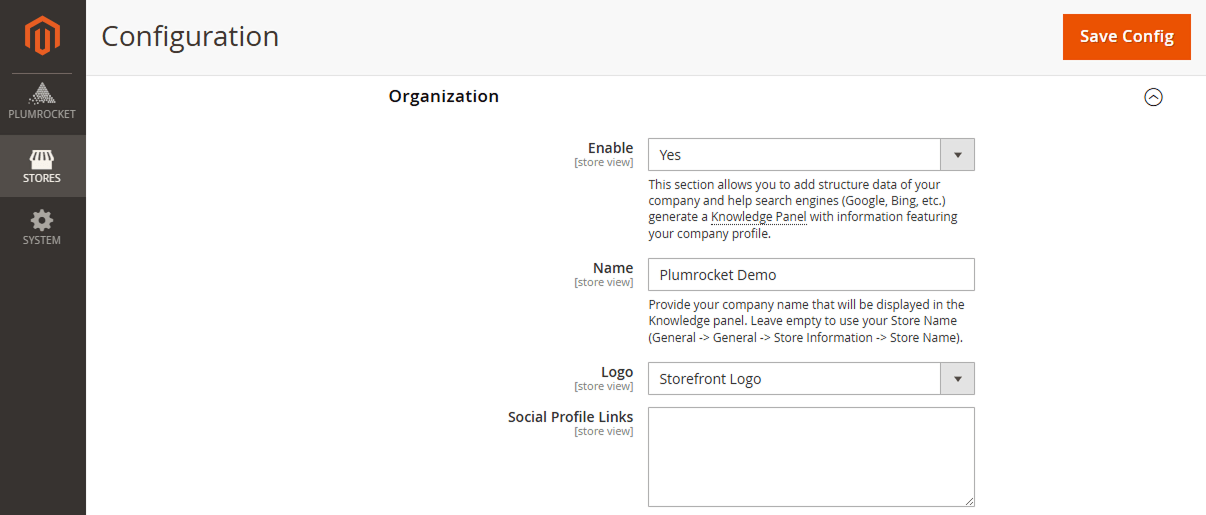
Add Organization Schema
Organization schema provides search engines with information about your business. This data can contribute to how your brand appears in search results and may support the creation of a Google Knowledge Panel.
Key information typically included in the organization schema includes:
- business name
- logo
- website URL
- social media profiles
Don’t forget to add links to your official social media accounts.
Test Your Structured Data
After completing the configuration, it’s important to verify that the structured data is implemented correctly. Click “Run Test” to open the validation tool and check that everything works properly.
Conclusion
Adding rich snippets in Magento 2 with structured data helps search engines understand your products, prices, reviews, and breadcrumbs, making your listings more attractive and trustworthy. By following this guide, you can boost click-through rates and maintain accurate, automated markup.
A well-configured rich snippet setup isn’t just optional—it’s essential for ecommerce stores that want to stand out in search results.
Frequently Asked Questions (FAQ)
How do I add rich snippets to Magento 2?
You can add rich snippets using a manual JSON-LD script, Google Tag Manager, or a dedicated Magento 2 extension that generates structured data automatically from your catalog.
Do I need a developer to add rich snippets in Magento 2?
Not necessarily. While manual coding requires a developer, using a Magento 2 structured data extension lets store owners configure rich snippets directly from the admin panel without coding.
Which rich snippets are most important for Magento products?
The most valuable snippets include product name, price, availability, rating, reviews, and breadcrumbs. These improve visibility and user trust in search results.
How can I test if my Magento 2 rich snippets are working?
You can verify your pages using Google’s Rich Results Test, which shows which structured data types are detected and highlights any errors or warnings. Within the extension, go to the Testing tab and click “Run Test” — this will open the tool with your page URL pre-loaded for easy validation.
