Connect new account
✕If you have multiple social networks accounts (like Facebook, Twitter, Google) - you can link your social accounts with your account at our store. This will allow you to access the website more conveniently!

You have no items in your shopping cart.

Magento 2 CSP Reports is a free extension that enhances the security workflow for Magento admins by providing detailed reports and notifications of blocked resources. This enables admins to control the Magento 2 content security policy (CSP), timely address any issues that arise, and ensure a secure browsing experience for customers.

| Product Details | |
| Version: | 1.2.0 (Sep 27, 2026) |
| Documentation: | User Guide |
| Live Demo: | View |
| Code Visibility: | 100% Open Code |
| Supported CE - EE: |
CE 2.3.5 - 2.4.9 EE 2.3.5 - 2.4.9 |
| License: | Single Magento Installation |
| Support Plan: | 12 months |
| Updates: | Free Updates |
| Refund Policy: | 60 Days (View) |

Starting from 2.3.5 version, Magento supports Content Security Policies (CSP) module - powerful functionality that controls resources the browser is allowed to load for a specific page. This ensures website protection against Cross Site Scripting (XSS) attacks, including card skimmers, session hijacking, and more. Magento also provides the ability to configure the functionality at the programming level, which requires coding skills and lacks a violation monitoring tool for admins.
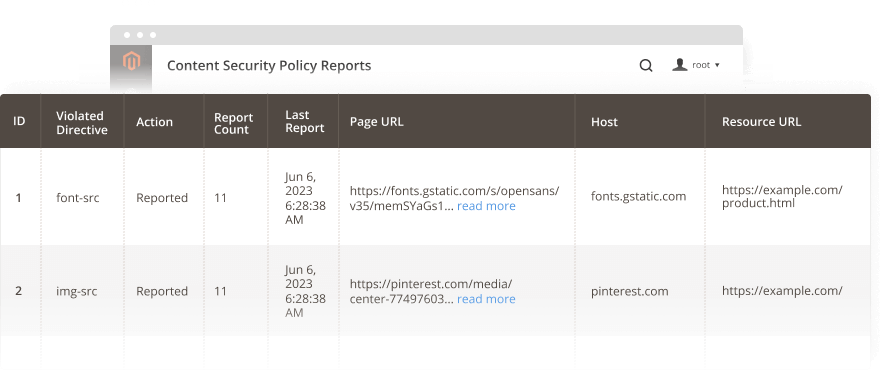
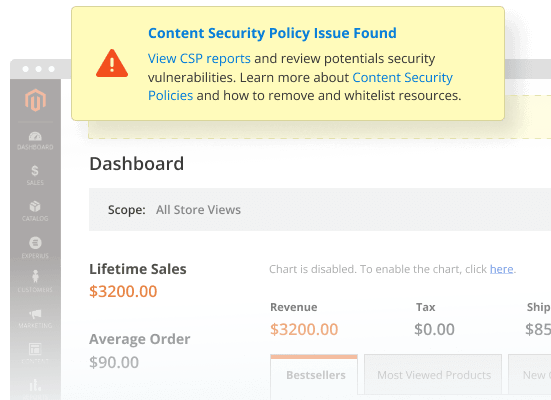
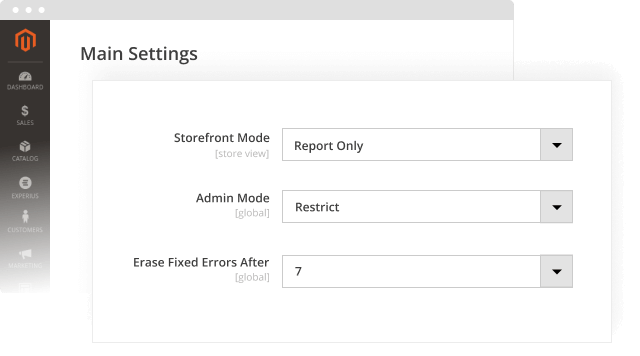
Our FREE Magento 2 CSP Module streamlines security management for both developers and admins. Store admins can configure CSP modes directly from the admin panel and effectively monitor policy violations with a user-friendly CSP reports grid. This enables timely issue identification and fixing to ensure a secure online shopping experience for customers. Additionally, the extension reduces the time for developers to whitelist safe resources and delete others.
 Write a Review
Every customer will automatically receive
$10 in reward points for each approved review.
It adds a reporting and notification layer on top of Magento's built-in Content Security Policy (CSP) module. It shows admins which resources were blocked or flagged on the storefront and admin panel, when, and why, so security issues can be caught and fixed without digging through server logs.
Yes, the extension is compatible with Hyvä Themes.
Content Security Policy helps block Cross-Site Scripting (XSS) attacks, including card skimmers, session hijacking, and clickjacking, by controlling which resources a browser is allowed to load on a given page.
Install it like any Plumrocket Magento 2 extension via Composer or manual file upload, then run setup upgrade and static content deploy. Full steps are in the Installation guide in the documentation.
Report Only logs policy violations without blocking anything, which is useful for testing. Restrict mode both reports and actively blocks violating resources.
Yes. Storefront Mode and Admin Mode are configured separately, so you can run Report Only on the storefront while keeping Restrict mode active in the admin area for stronger protection of customer data.
Use the "Erase Outdated Reports After (days)" setting in Configuration. Any violation that hasn't reoccurred within that number of days is automatically cleared from the grid.
Go to Plumrocket > CSP Reports > Reports in the admin menu. The grid shows the host, violated directive, resource and page URL, action taken, report count, and last report date.
Yes, the CSP Reports extension for Magento 2 sends admin notifications for each new Content Security Policy violation so issues can be addressed promptly rather than discovered later.
Fully disabling the Csp module removes Magento's built-in security headers store-wide and isn't recommended. A safer option is switching Storefront Mode to "Report Only" in Plumrocket > CSP Reports > Configuration. This stops CSP from blocking any resources while still logging violations, so you get the effect of disabling enforcement without losing visibility.
Whitelisting is configured in code, either through a csp_whitelist.xml file or, for inline scripts, by using a nonce. Plumrocket CSP Reports extension for Magento 2 doesn't add whitelisting itself, but its reports grid shows the exact host, directive, and resource URL behind each violation, so developers know precisely what to add without digging through browser console logs.
Version 1.2.0 Sep 27, 2026
Version 1.1.0 Sep 07, 2026
Version 1.0.2 Oct 21, 2025
Version 1.0.1 Jul 04, 2023
Version 1.0.0 Jun 29, 2023