Warning: Undefined array key "saswp_howto_tip_text" in /var/www/learn.plumrocket.com/web/learn/wp-content/plugins/schema-and-structured-data-for-wp/output/markup.php on line 365

Warning: Undefined array key "saswp_howto_tip_text" in /var/www/learn.plumrocket.com/web/learn/wp-content/plugins/schema-and-structured-data-for-wp/output/markup.php on line 365

Warning: Undefined array key "saswp_howto_tip_text" in /var/www/learn.plumrocket.com/web/learn/wp-content/plugins/schema-and-structured-data-for-wp/output/markup.php on line 365

Warning: Undefined array key "saswp_howto_about_1235" in /var/www/learn.plumrocket.com/web/learn/wp-content/plugins/schema-and-structured-data-for-wp/output/markup.php on line 420

Warning: Trying to access array offset on null in /var/www/learn.plumrocket.com/web/learn/wp-content/plugins/schema-and-structured-data-for-wp/output/markup.php on line 420

How to Clear Magento Cache

In this article, you will learn how to clear Magento Cache in a few clicks:

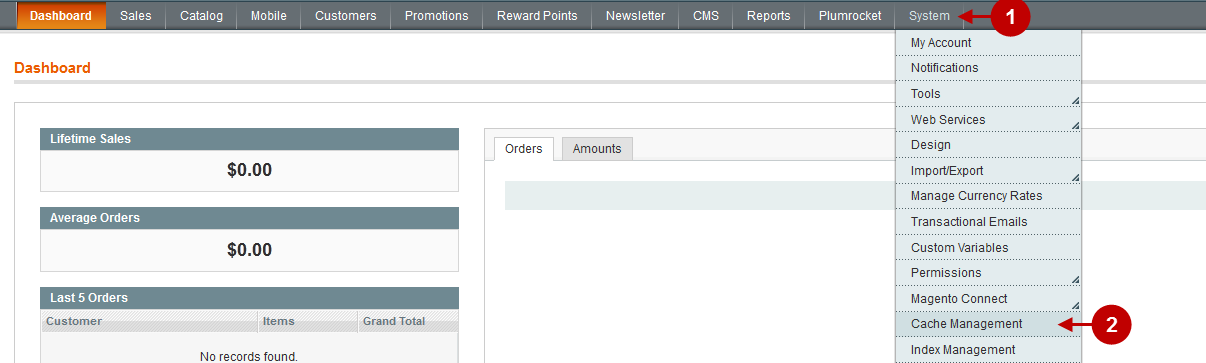
  1. Go to the Admin Panel -> System.
  2. Click on Cache Management.
Clear-cache-wide
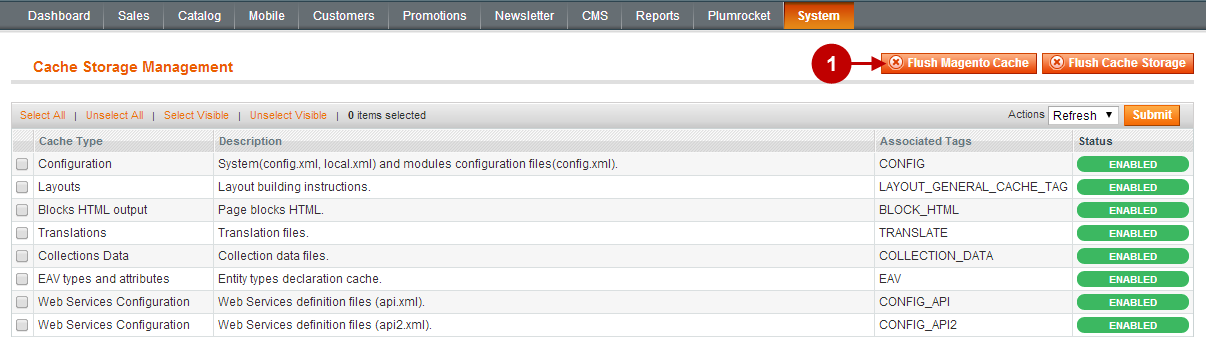
  1. Press the Flush Magento Cache button.
Flush Magento Cache
About The Author: Anastasiia Yaremchuk

Deeply passionate about making a good copy. Now exploring new horizons of SEO and content marketing. Apart from the digital world, she is obsessed with travelling, films and caffeine. View more posts