

Magento 2 provides a set of default statuses, which may vary depending on version and installed payment modules (e.g., PayPal adds additional statuses): Received, Suspected Fraud, Processing, Pending Payment, Payment Review, Pending, On Hold, Complete, Closed, Canceled, Rejected, PayPal Canceled Reversal, Pending PayPal, PayPal Reversed.
These statuses help merchants track the progress of each order through the fulfillment process.
There are several ways to change order status in Magento 2, depending on your requirements:
- Manually through the Magento Admin panel
- Programmatically using custom code
- Via Magento REST API
- Automatically using Magento 2 extensions
In this article, we will walk you through each of these methods. Choose the method that best aligns with your specific needs and technical capabilities.
Improve order processing speed with automatic invoicing, shipping creation, and status updates using our Auto Invoice & Shipment Extension.
How to Change Order Status in Magento 2 Manually in the Admin Panel
In the Magento 2 admin panel, you can only manually change the order status to On Hold or Canceled. All other statuses depend on payment method, payment status, shipping, and refunds.
Steps to change order status to Canceled or On hold status:
Step-by-step guide:
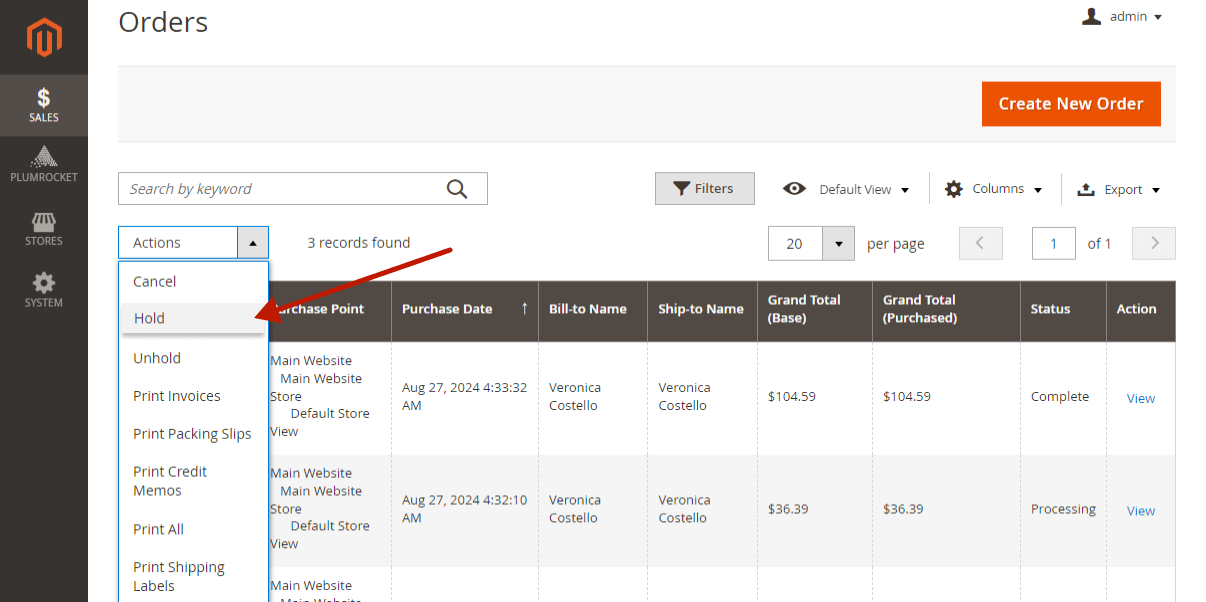
- Open the Magento 2 Orders grid page.
- Use checkboxes to select the orders you want to change the status of.
- Choose the Cancel or Hold option from the Actions drop-down.
How to Change Order Status in Magento 2 Programmatically
Magento provides the OrderManagementInterface for performing standard order management actions.
In this example, we will create a Magento 2 model called ManageOrder that can hold, unhold, or cancel an order programmatically.
<?php

declare(strict_types=1);

namespace Vendor\OrderManagement\Model;

use Magento\Sales\Api\OrderManagementInterface;

class ManageOrder
{
    public function __construct(
        private readonly OrderManagementInterface $orderManagement
    ) {
    }

    public function hold(int $orderId): void
    {
        $this->orderManagement->hold($orderId);
    }

    public function unhold(int $orderId): void
    {
        $this->orderManagement->unHold($orderId);
    }

    public function cancel(int $orderId): void
    {
        $this->orderManagement->cancel($orderId);
    }
}
The following example shows how to use the ManageOrder model. Simply pass the order ID to the appropriate method depending on the action you pAGEwant to perform.
<?php

declare(strict_types=1);

namespace Vendor\OrderManagement\Console\Command;

use Vendor\OrderManagement\Model\ManageOrder;

class Example
{
    public function __construct(
        private readonly ManageOrder $manageOrder
    ) {
    }

    public function execute(): void
    {
        $this->manageOrder->hold(123);
    }
}
Here, the order with ID 123 will be placed on hold. In the same way, you can call unhold() or cancel() to perform the corresponding action.
How to Change Order Status in Magento 2 via REST API
To cancel an order through the Magento 2 REST API, obtain an access token and then call the dedicated cancel endpoint.
- Get an Admin Access Token
If two-factor authentication is not enabled for the admin account, use:
curl -X POST \
  "https://magento-store.com/rest/V1/integration/admin/token" \
  -H "Content-Type: application/json" \
  -d '{
    "username": "admin_username",
    "password": "admin_password"
  }'
If 2FA with Google Authenticator is enabled, send the current six-digit one-time password using the 2FA endpoint:
curl -X POST \
  "https://magento-store.com/rest/V1/tfa/provider/google/authenticate" \
  -H "Content-Type: application/json" \
  -d '{
    "username": "admin_username",
    "password": "admin_password",
    "otp": "123456"
  }'
A successful request returns an admin access token. The endpoint may differ if another 2FA provider is configured.
- Cancel the Order
Replace <access-token> with the returned token and <orderId> with the internal Magento order entity ID:
curl -X POST \
  "https://magento-store.com/rest/V1/orders/<orderId>/cancel" \
  -H "Content-Type: application/json" \
  -H "Authorization: Bearer <access-token>"
Magento validates whether the order can be canceled and processes the cancellation using its standard order management logic.
Similar REST API endpoints are available for other order operations, such as placing an order on hold or releasing it from hold:
POST /rest/V1/orders/<orderId>/hold
POST /rest/V1/orders/<orderId>/unhold
POST /rest/V1/orders/<orderId>/cancel
For operations such as invoicing or shipping, Magento provides separate REST API endpoints and request payloads.
How to Change Order Status in Magento 2 Automatically
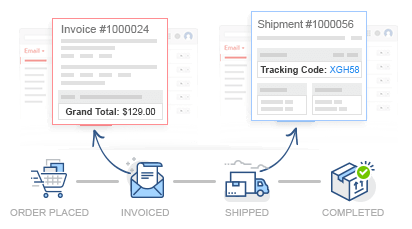
One efficient way to automate order status updates in Magento 2 is by using the Magento 2 Auto Invoice & Shipment Extension. This extension can automatically generate invoices and shipments, which triggers an automatic change in the order status to Processing or Complete, depending on the fulfillment stage.
Key features of this extension include:
Bulk Invoice and Shipment
The extension enables store admins to generate Magento invoices and shipments in bulk, saving time and streamlining order processing.
Flexible Rules
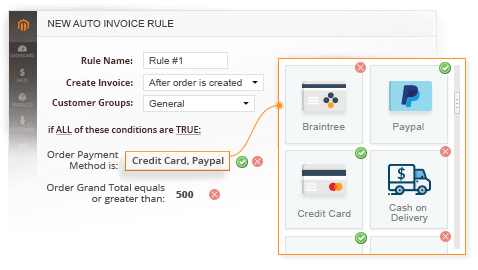
You can configure specific rules to specify when and how invoices and shipments are created automatically. These rules allow you to set conditions based on payment methods, order status, or other criteria, ensuring that your workflow aligns with your business needs.
Support for Partial Invoices and Shipments
If your business deals with partial shipments or split orders, the extension allows you to create partial invoices and shipments. This ensures that order statuses are updated correctly for each portion of the order that is fulfilled.

Automate the invoicing and shipping process to ensure order management efficiency and timely status updates.
Frequently Asked Questions (FAQ)
Magento restricts the Complete status because it should only be applied when an order has been fully invoiced and shipped. To set it programmatically, you must do it through custom code or an integration.
Yes, but Magento requires that the state and status pair be valid.
For example, you cannot set status = complete unless the order state supports it or workflow rules are bypassed programmatically.
You can use automation tools such as the Auto Invoice & Shipment Extension for Magento 2, which automatically generates invoices and shipments. This triggers automatic status changes and reduces manual admin work.
