Social Login for E-Commerce: Overview of the Top Online Stores
Nobody wants to invent another password to buy a pair of shoes. That has always been true, but the numbers have finally caught up with the frustration. In its State of Passkeys 2026 report, the FIDO Alliance found that 90% of people now know what a passkey is, 75% have enabled one on at least one account, and 49% use passkeys regularly wherever they are offered. An estimated 5 billion passkeys are in use worldwide.
Your customers have spent the last two years signing in to their bank, their email and their phone without typing a password. Then they land on your checkout and meet a registration form. Every extra field is a reason to leave.
In the sections that follow, we’ll explore how top e-commerce global brands implement social login to enhance user experience – and how you can do the same with Magento.
Quick Post Navigation:
- How Leading Brands Leverage Social Login in E-Commerce
- How to Do Social Login Like the Big Players
- Final Lines
How Leading Brands Leverage Social Login in E-Commerce
The way global e-commerce leaders use social login reveals just how powerful a well-designed login experience can be. Let’s explore how they turn a simple sign-in option into a competitive advantage.
#1 Best Buy
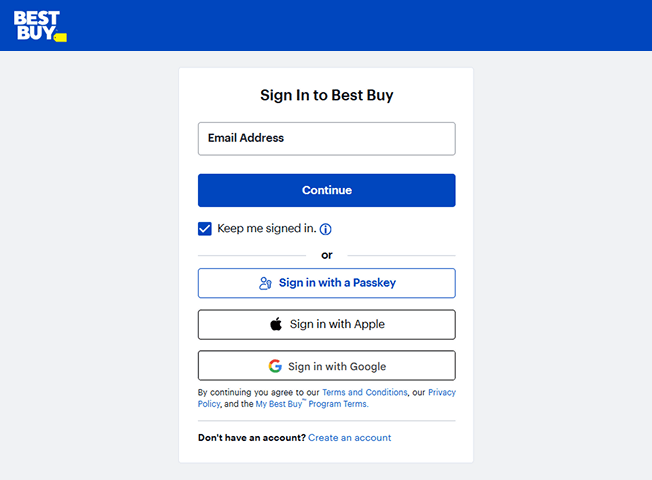
First in our top-10 is a website of the very famous US based electronics retailer – Best Buy. As you can see in the screenshot, visitors have several convenient ways to access their accounts. In addition to the standard email login, Best Buy provides options to “Sign in with a Passkey“, “Sign in with Apple“, and “Sign in with Google“.
#2 ASOS
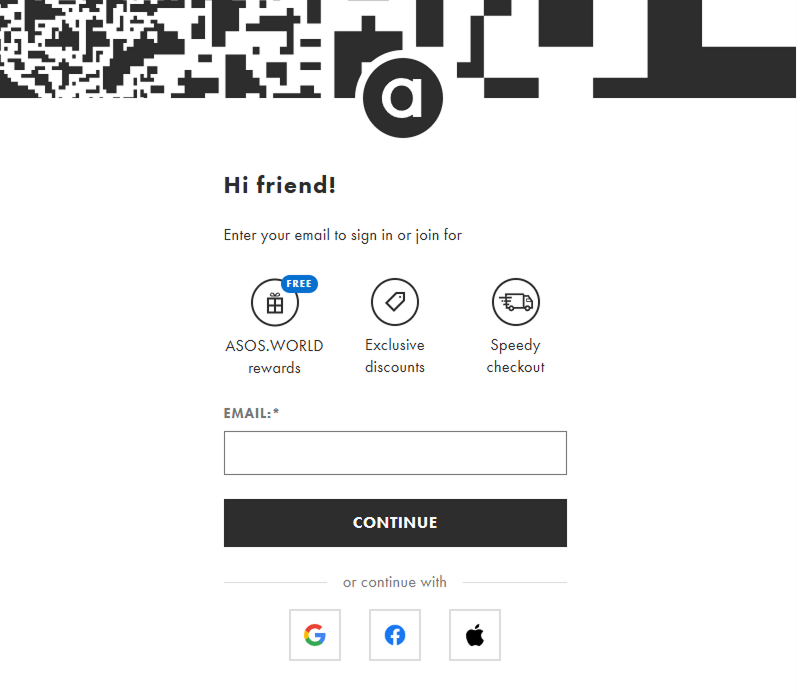
ASOS, a globally popular British online fashion and beauty store, provides another great example of an effective login page. The page uses a friendly “Hi friend!” greeting and clearly communicates the benefits of joining, such as “ASOS.WORLD rewards,” “Exclusive discounts,” and “Speedy checkout.”
For authentication, ASOS presents the traditional email sign-in alongside prominent social login options. Users can choose to “continue with” Google, Facebook, or Apple, making the sign-in and registration process quick and seamless. This approach towards e-commerce social media login usage encourages account creation by showcasing value and providing convenient, one-click access.
#3 Etsy
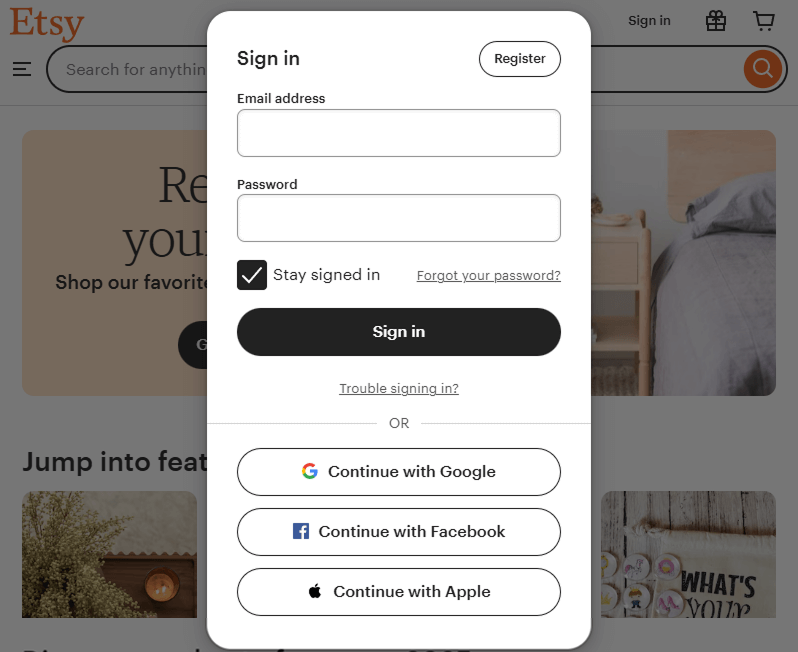
Etsy, the global marketplace for unique and creative goods, offers its customers the ability to create an account or “Sign In” with today’s most popular social networks: Google, Facebook, and Apple.
Note, it is important to remember that the process of choosing the social login networks for your e-commerce website should be based on the customers’ social media preferences. For instance, if you have an online fashion store or any other women-related business, it is suggested to include social login via Facebook. In case you run the online shop to buy electronics, the implementation of Google and Twitter social login options can be a great idea for keeping the clients engaged on your website.
#4 Epic Games
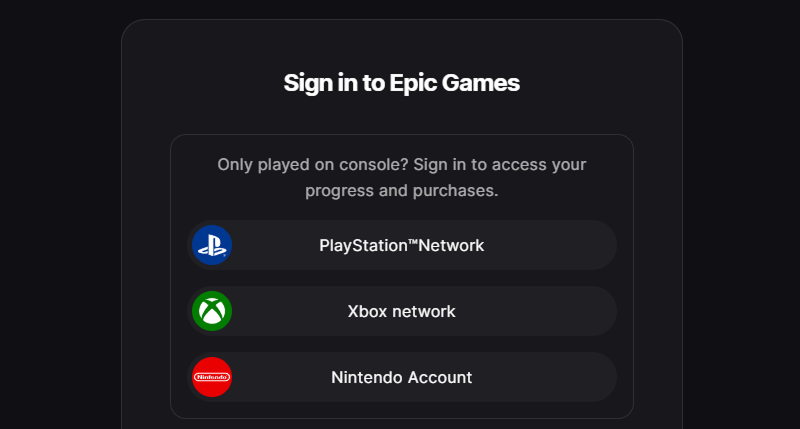
Epic Games, a powerhouse in the video game industry, provides a login page that is a masterclass in audience segmentation. Recognizing that gamers access their platform from various devices and ecosystems, Epic has tailored its sign-in process with remarkable precision. Thus, they offer a great example of social login strategic usage.
The page is intelligently divided. It first greets console players with a dedicated section, allowing them to sign in directly with their PlayStation™Network, Xbox network, or Nintendo Account. This is a brilliant strategic move, treating these gaming identities as the primary “social” logins for this user segment and ensuring seamless access to their progress and purchases.
For PC, mobile, and other users, the page offers an impressive array of “Other ways to sign in” beyond the standard email. Crucially, this includes a Steam login, catering directly to the massive PC gaming community. Even more notable are the options to sign in with a MyDisney Account and a LEGO® Account.
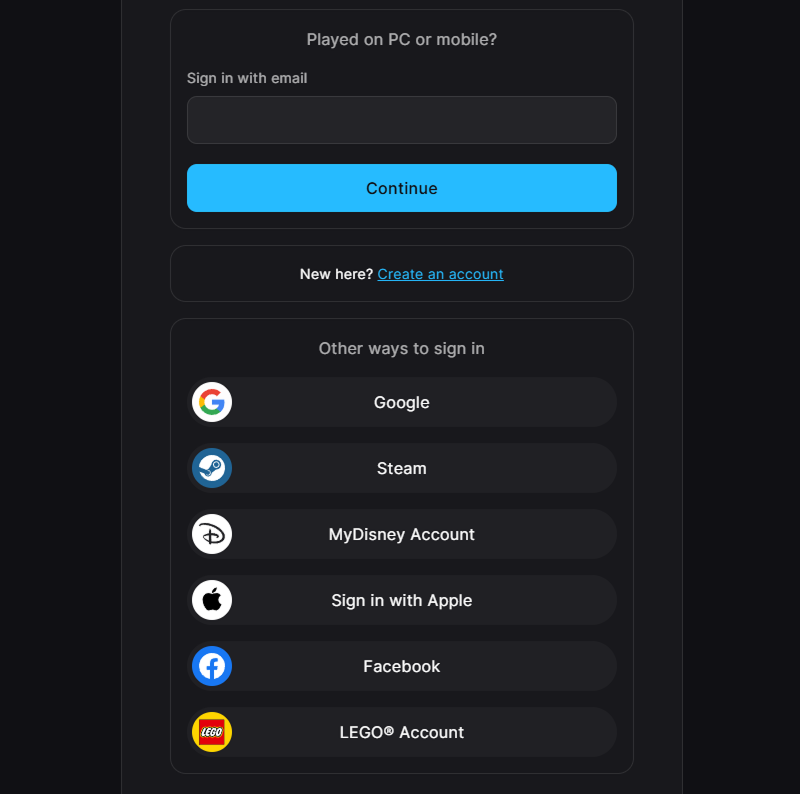
Epic Games’ approach is a powerful example of how to build a login system that truly understands and serves a diverse, multi-platform user base.
#5 Adidas
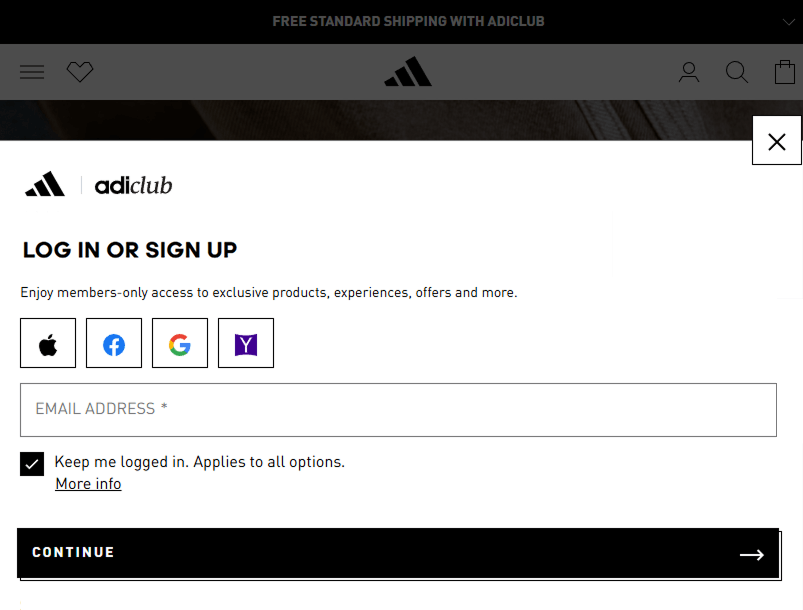
Global sportswear giant Adidas offers another powerful case study in effective social login in e-commerce. The brand uses a clean, non-disruptive pop-up for its “LOG IN OR SIGN UP” form, immediately framing the action as an entry point to its exclusive “adiClub” loyalty program.
What makes this one of the most compelling social media login examples is its strategic layout. Adidas places its social login options—Apple, Facebook, Google, and even Yahoo—prominently at the top, even before the traditional email field.
Notably, Adidas also includes Yahoo as an option. While less common in modern forms, its inclusion suggests a data-driven decision to cater to a specific segment of their customer base.
#6 EVERLANE
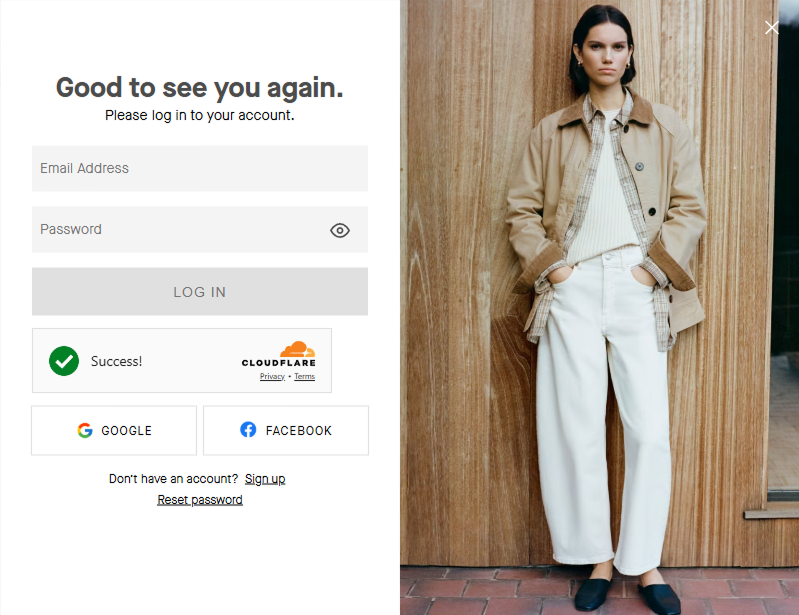
This modern fashion retailer, with its chic and minimalist aesthetic, uses a sophisticated login pop-up that perfectly matches its brand identity.
With a welcoming “Good to see you again” message, the form presents the standard email and password fields first. Below the primary login button, it offers distinct options for Google and Facebook, providing a fast and convenient alternative for users.
#7 Zara
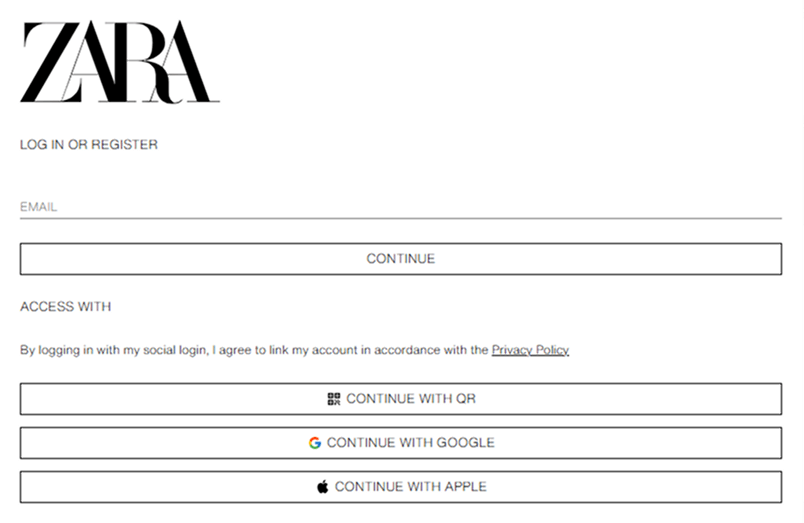
Zara, the global fast-fashion retailer, keeps its “Log in or register” page as stripped-back as its stores. One field to start: email. No password box, no separate registration form. Enter an email, hit Continue, and Zara works out from there whether you are a returning customer or a new one.
Under “Access with” sit three one-click options: Continue with QR, Continue with Google, and Continue with Apple. The QR option is the interesting one, a scan-to-sign-in flow rather than a third-party network, which suits a brand whose customers already use its app in store.
Notice what is missing, too. No Facebook, on a fashion site where it used to be the default. And the consent line sits right above the buttons, telling customers their accounts will be linked under the Privacy Policy before they click, not after.
#8 Dell
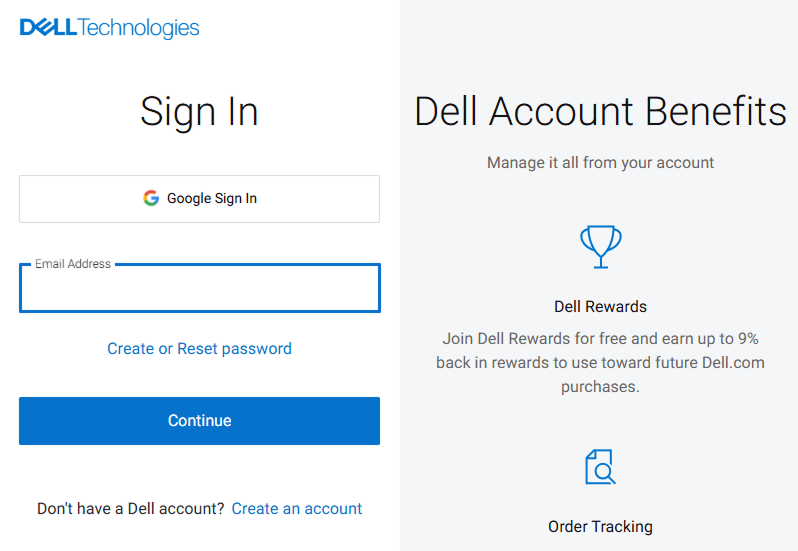
The next example of e-commerce social login implementation is Dell Technologies. This is a major American multinational technology company famous for its computers and enterprise solutions. Their sign-in page, as seen in the screenshot, offers a very deliberate and strategic approach to user access.
Visitors are presented with a large “Google Sign In” button placed at the very top, followed by the standard email address login.
Unlike other brands that offer a wide array of social logins, Dell has made a calculated decision to feature only Google. This choice is highly strategic. Google is a near-universal platform, widely used by both individual consumers and professionals who use Google Workspace.
#9 AliExpress
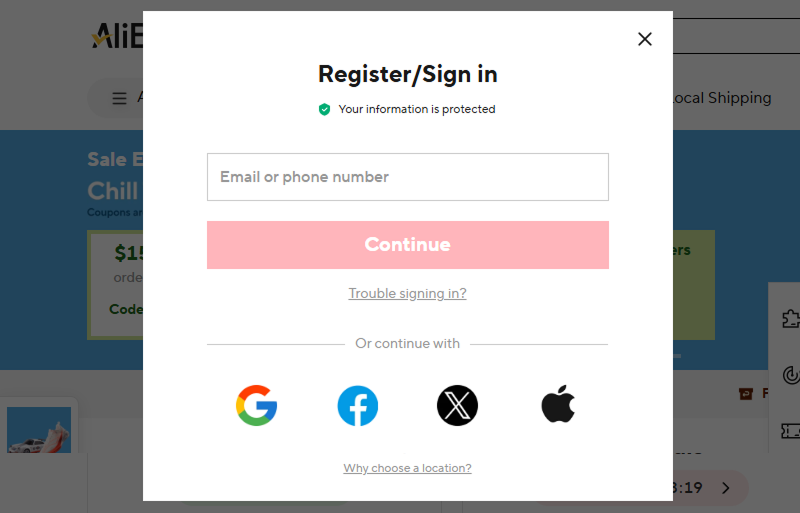
Global e-commerce giant AliExpress provides an excellent social login example within its streamlined Register/Sign in pop-up. The modal immediately builds confidence with a “Your information is protected” message, a crucial trust signal for any online store.
While it offers a flexible primary login that accepts an email or phone number, its strength lies in the array of social media login options presented below: Google, Facebook, X (formerly Twitter), and Apple. This multi-option strategy is crucial for a global retailer, ensuring that a diverse international audience has a convenient, one-click method to access their account.
#10 Zappos
One more example of social login usage in e-commerce is Zapppos. Launched in 1999, the company is a popular e-store that deals with designer shoes, clothes and accessories for men, women, and kids. In July 2009, Amazon acquired Zappos in an all-stock deal worth around $1.2 billion.
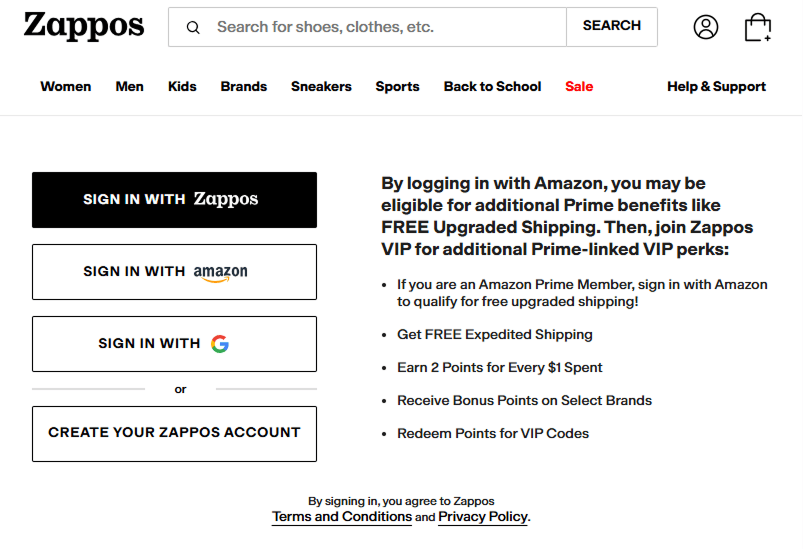
Returning visitors get three one-click options: “Sign in with Zappos“, “Sign in with Amazon“, and “Sign in with Google“. No Facebook, no Apple. Like Dell, Zappos keeps the list short.
The smart part is the copy next to the buttons. Zappos does not just offer the Amazon option, it spells out the payoff: Prime members who sign in with Amazon may become eligible for free upgraded shipping, plus Zappos VIP perks like 2 points per $1 spent and points redeemable for VIP codes. That turns a login choice into a loyalty signup.
As you can see, social login for e-commerce is used by various online stores for streamlining the registration process, improving user experience and boosting sales. So, if the above -mentioned examples convinced you to use social login on your website, then Magento Social Login Extension provided by Plumrocket is your option to consider.
Top 3 Popular Social Media Login Options
#1 Google Login
Google is the go-to social login provider across most industries. With its universal adoption across Android, Gmail, YouTube, and Chrome, it’s the most familiar and trusted option for users. It performs especially well in:
- Electronics
- Mobile-first markets
- General retail
- B2B commerce (thanks to Google Workspace adoption)
#2 Apple Login
Apple and Facebook traded places this year. Apple sat at number three when we last updated this list, and it now edges ahead. Its Hide My Email relay appeals to privacy-conscious shoppers, and on iOS it feels native rather than like a third-party detour. Strongest in:
- North America and Western Europe
- Mobile-heavy user bases
- Premium and design-led product categories
#3 Facebook Login
Facebook still converts, but it is no longer automatic. Dell, Zara, Best Buy and Zappos all offer social login without it. Worth including when:
- Your audience skews older or is genuinely active on the platform
- Community and brand interaction are part of the experience
- Your own data says customers use it
That last point matters more than the first two. Social Login Pro tracks which providers your customers actually pick, so after a month you are choosing from your own numbers instead of an industry average.
The takeaway: you don’t need every option. You need two or three your customers already trust, and a reason to believe it. Too many buttons is its own conversion problem.
How to Do Social Login Like the Big Players
Looking at the social login implementation examples from brands like ASOS, Adidas, and Epic Games, one thing becomes clear: Social login is not just about convenience — it’s a core part of their customer experience strategy.
They’re not offering Google or Facebook login just for the sake of it. They’re using it to:
- Remove friction from the registration process
- Speed up checkout
- Gather verified user data
- Drive loyalty program engagement
- Increase first-time and repeat purchases
This isn’t just good UX — it’s good business.
That’s where a flexible solution like Magento 2 Social Login Extension comes in. This extension was built with exactly this philosophy in mind. It lets you:
- Offer the same popular social networks and more than 50 others that your customers already use.
- Place login buttons strategically across your site — registration, login, checkout, popups, etc.
- Display customer profile photos for a personal touch, just like you see on top platforms.
- Collect real, verified data (name, email, birthday, etc.) to tailor your messaging and offers.
- Give customers the option to socially share your store post-signup, turning users into promoters.
As you can see, Social Login Extension for Magento 2 can help you accelerate customer engagement, gather personal information to run targeted marketing campaigns, use website social share to promote your online shop, etc.
So, in case you want to learn more information on the plugin and check the features of the service, you can run a free demo or explore the documentation.
Final Lines
Today’s e-commerce companies use various ways to stay competitive and make the business successful. So, if you want to achieve the desired results, social login is considered one of the imperative tools to include into your business strategy. The above-mentioned examples of social login implementation can help you understand the importance of the service, and provide you with an opportunity to select one of them for your e-store website. Hence, offer a choice of “Sign Up” and “Sign In” options and give customers control of how they want to interact with your organization.