Ecommerce Product Badges: Examples from Top Retailers [2026]
![Ecommerce Product Badges: Examples from Top Retailers [2026]](https://plumrocket.com/blog/wp-content/webpc-passthru.php?src=https://plumrocket.com/blog/wp-content/uploads/2024/07/blog-post-ecommerce-product-badges-2.png&nocache=1 "Ecommerce Product Badges: Examples from Top Retailers [2026]")
Product badges in ecommerce serve as helpful guides for users, showcasing an item’s availability, current sales, or special deals. Colorful badges and low prices seize visitors’ attention and make the purchase an excellent bargain. For merchants, using product badges is a great way to promote items and sell them quickly.
With so many product badges available for different promotions and product attributes, we decided to create this guide to help you navigate the options. You’ll get a clear overview of the most effective ecommerce product badges and learn how to choose the right ones for your store—whether you’re implementing them manually or using a dedicated Magento Product Labels extension to streamline setup and management.
How Ecommerce Product Badges Attract and Convert
Using badges gives several huge benefits that help your business perform better in the highly competitive ecommerce business:
Grab attention
Nowadays, due to a wide range of quickly generated content, people have short attention spans. Thus, businesses have to find ways to grab their attention and stand out. For instance, badges quickly communicate messages like:
- Sale → active discounts
- New → fresh arrivals
- Bestseller → trusted by many customers
Thanks to product badges’ eye-catching design, they make visitors stop and click on a product. This leverages CTR (Click Through Rate) and boosts conversions on the website.
Convey key information
Despite their small size, product badges can convey key messages about the product. For example, a badge such as “Sale” highlights the current discounts on the website, “New” informs about recently added items, and “Bestseller” indicates that this product is selling the best and people trust it.
Boost conversions
Some product badges create a sense of urgency and exclusivity by using phrases like “Sale” or “Only 5 left.” They tap into subconscious buying motivations, and according to statistics, they increase conversion rates by 55%.
Improve customer experience
Badges help visitors quickly find products with a specific feature, which improves the navigation of your website. Ultimately, labeling products enhances customer experience and leads to conversions.
If you want to implement badges quickly on a Magento 2 store, try our Product Labels Extension—a customizable, mobile-friendly, conversion-optimized solution designed for modern ecommerce.
Types & Examples of Product Badges
The design and labels of product badges in ecommerce vary from website to website, because everyone wants to translate their unique brand identity and experiment with what captures customer attention and motivates sales. As a result, you can see a wide range of product badges, which is a great source of inspiration. But don’t be afraid to tailor the content and style of your badges to perfectly match your offerings and website design.
Let’s dive deeper into the different types of product badges and see how they are used for different purposes to reach maximum impact:
Time-Sensitive Badges
- New arrivals: This badge indicates the website’s fresh products and deals. It is a universal badge that works well across most ecommerce stores.
- Seasonal/holidays/current events: These are effective for boosting sales during specific periods or events. For example, the summer sale is a nice time to use these badges and sell time-specific products, which will not be interesting for people during other periods of time.
- Hot today: This is an effective urgency trigger, creating a sense of exclusiveness and a great deal. A badge like this helps focus users’ attention on trending items and sell products faster.
- Limited edition/Low inventory: These badges work well for exclusive collections with a limited number and for items that are about to disappear. They express urgency and desirability for the products before they are gone.
- Hard to find: Using this badge concentrates on delivering mystery and desirability to high-demand items.
- Countdown timers: This badge counts down days or hours to the end of the sale. It is very effective for creating scarcity and urgency. The use of this product badge should be meaningful and without overwhelming.
- Deal of the day: To highlight the temporary discount, use this badge. It can nudge visitors to complete their purchase sooner rather than later.
Social Proof Badges
- Bestseller: This badge is used very often to indicate the product’s popularity and desirability. It serves as a social proof showcasing that the item is bought by many people.
- Staff picks: This one is used less frequently but does not work worse than others. Usually, this badge adds a personal touch, suggesting expert curation by the staff.
- As seen on: This product badge boosts credibility by associating with trusted sources. It can be connected with items seen in a movie or worn by an actor.
- Back-in-stock: Some items are so popular that they require featuring their availability in stock.
- Pre-order: To create a sense of excitement and anticipation for highly-desired products, this product badge. It allows buyers to pre-order the item while giving business owners insights into pre-launch demand.
Product Attribute Badges
- New: this badge suggests that the product was recently added to the inventory and it target customers are interested in being among the first to own the latest products.
- Free Shipping: using this badge eliminate hesitations before purchasing. It indicates that there are no additional charges for the item. Highlighting this feature can boost customer satisfaction and lead to purchases.
- Organic: This badge is appealing to environmentally conscious visitors who are concerned about products’ ingredients or materials.
- Cotton: Highlighting items’ material using product badges is a great way to promote and improve navigation on your website. This will help visitors easily find products made of a specific material, ultimately increasing customer satisfaction.
Top Examples of Product Badges from Leading Stores
We conducted research among the 30+ most popular online stores to find out which product badges are used most often. While badges can vary by website, here are the ones you’ll see most often:
1. Bestseller
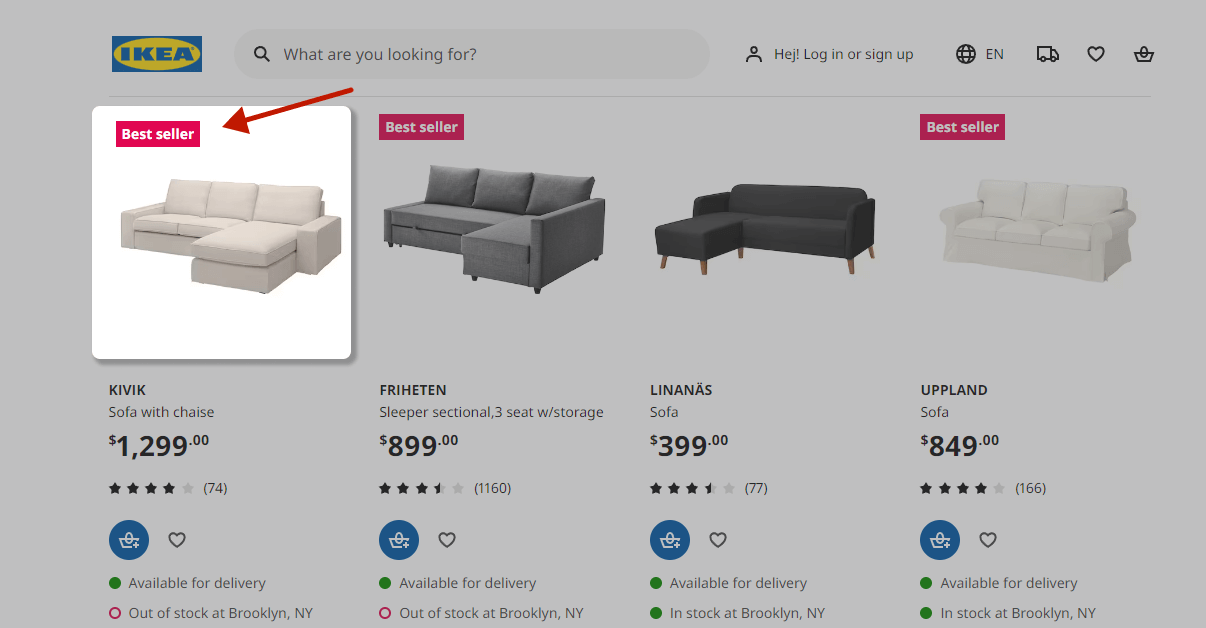
The most commonly used product label on ecommerce websites is “Bestseller”.It is usually located at the top of the product icon and looks catchy, so it is hard not to notice. You can see other variations of the “Bestseller” badge, such as “Top rated”, or “Trending now”, but all of them reflect the social proof effect that makes them so powerful.
2. Save 10%, Sale
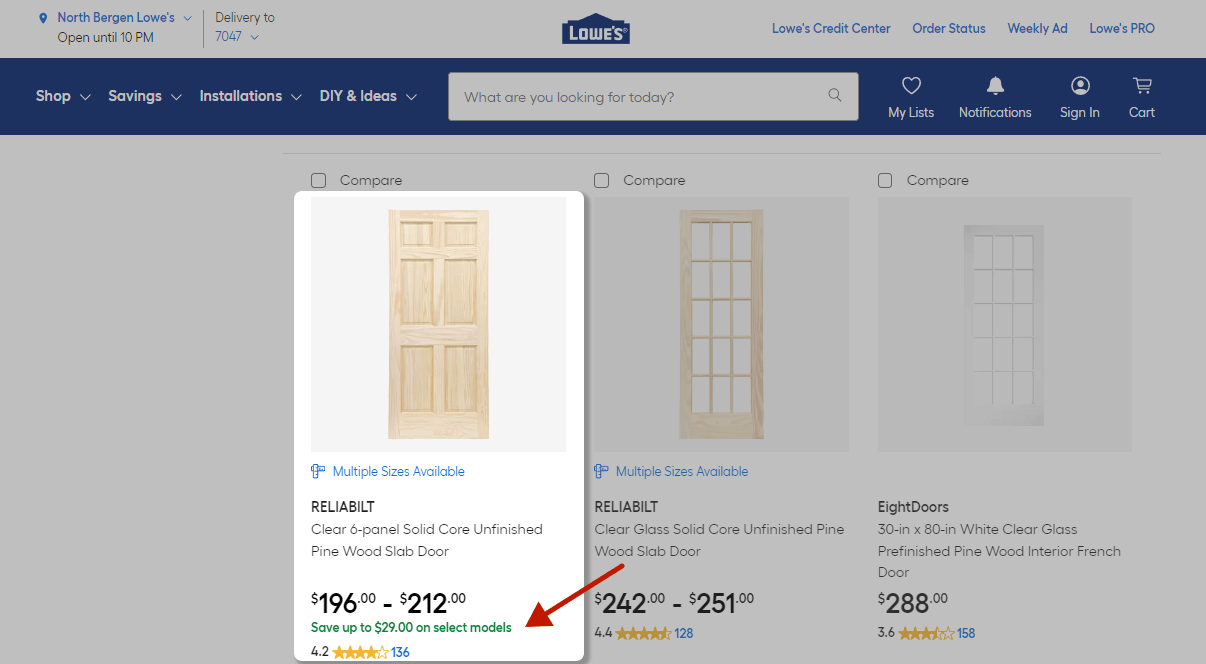
These product badges show users how much they can save when buying products. Items with discounts are very appealing to people because they create a sense of getting a good deal. Therefore, price sensitivity remains a significant factor in online shopping.
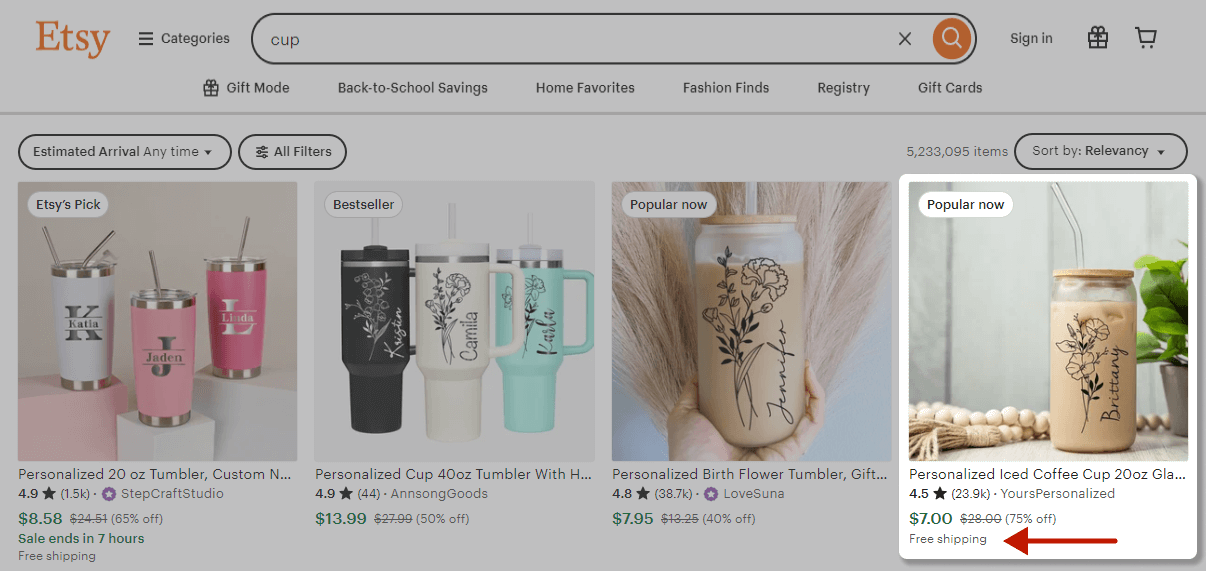
3. Free shipping
Free shipping eliminates a major barrier to purchase and is often a deciding factor for online shoppers. Usually, “Free Shipping” is used as a secondary badge and is displayed at the bottom of the product icon or next to the price. However, this fact doesn’t diminish the badge’s power – it ultimately reduces hesitation and leads to conversions.
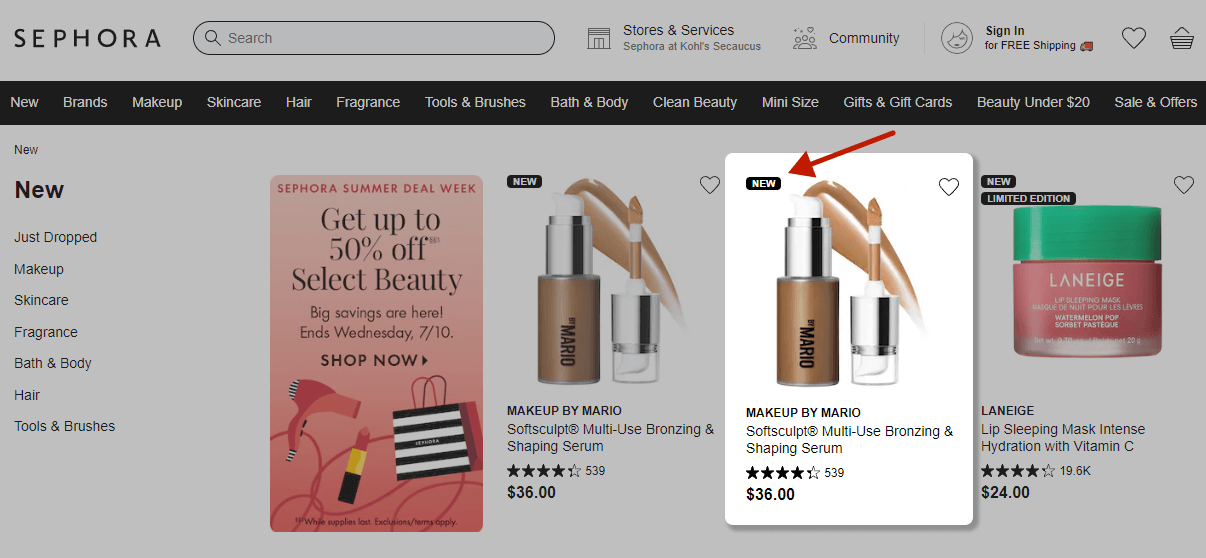
4. New
Ecommerce stores use this product badging example to spotlight new products. It indicates the website offers fresh inventory and attracts curious shoppers.
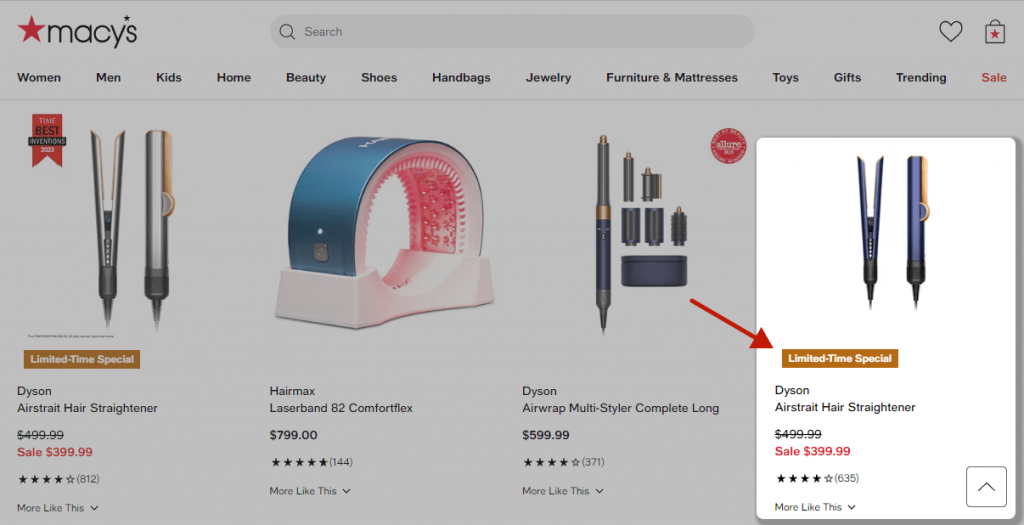
5. Limited time deals
There are many similar badges, like “10 days left”, “Selling fast “, or “Deal of the day.” All of them expressed urgency and limited the amount. Their frequent usage speaks to their effectiveness and conversion-driven effect.
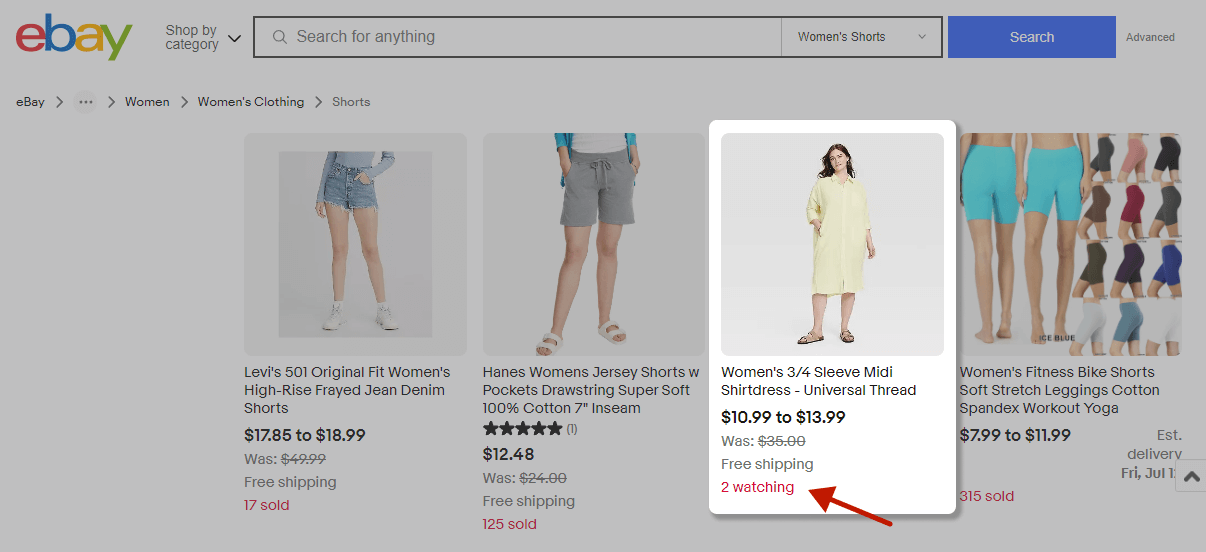
6. Live indicators
Badges like “203 watching” and“10 sold” are used less often and usually on big marketplaces. They show a dynamic number that updates in real-time to create a sense of urgency, prompting customers to act before the opportunity disappears. A prominent example is eBay, which strategically displays these badges to showcase demand.
Overall, it’s paramount to mix different product badges to create an ecommerce store that communicates value, trust, and convenience. According to the research, “bestseller”, “sale”, and “free shipping” are the most familiar and powerful badges that can drive conversions.
Also, the research showed that countdown timers and badges are used less frequently, so before implementing a marketing strategy, take it into consideration.
Easily add high-converting badges like Bestseller, Sale, and Free Shipping to your Magento 2 store with our Product Labels Extension — start driving conversions today!
How to Place Product Badges for Maximum Impact
Even the most eye-catching badge won’t drive conversions if it’s in the wrong spot. Strategic placement ensures badges guide shoppers effectively, boost CTR, and enhance the user experience.
Use the Top-Left Corner for Primary Badges
The top-left corner of the product image is where users naturally start scanning. This makes it ideal for high-impact badges.
This placement immediately communicates key information without obscuring the product. Studies on visual hierarchy show that the top-left area receives the most attention first, ensuring that your badge is noticed before users scroll or click elsewhere.
Also, keep the badge size balanced so it stands out but doesn’t dominate the image. For example, a badge covering 10–15% of the product image usually works well.
Place Discount or Price-Driven Badges Near the Price
Badges related to discounts or pricing—like “Save 20%”, “Free Shipping”, or “Deal of the Day”—perform best when located near the product price or the add-to-cart button.
Shoppers make decisions around the price. Placing a badge near this area reinforces the value proposition at the exact moment they consider purchasing.
Limit to One Primary Badge + Optional Secondary Badge
Overloading products with badges in ecommerce creates visual clutter and reduces their effectiveness. For clarity:
- Primary badge: Conveys the main message, such as Sale, New, or Bestseller.
- Secondary badge (optional): Provides supporting info, like Free Shipping, Organic, or Material.
This hierarchy ensures that the most important message is communicated first, while secondary badges add extra information without overwhelming the shopper.
Prioritize Mobile-Friendly Placement
Most online shopping now happens on mobile, making mobile optimization essential. On small screens:
- Keep badges small and unobtrusive
- Use 1–2 badges per product at most
- Make sure badges don’t cover images, swatches, or variant options
- Test how badges interact with zoom, swipe, and scroll gestures
Consider using icon-based badges or minimal text badges on mobile to communicate key information clearly without taking up too much space.
Avoid Covering Key Product Details
Product badges for ecommerce stores should never obscure critical product information, including:
- The product itself
- Pricing
- Color swatches
- Variant options
If a badge blocks key details, shoppers may get frustrated or misinterpret the product, leading to abandoned carts. To avoid this, use transparent backgrounds, smaller sizes, or reposition badges slightly outside the product image if necessary.
How to Add Product Badges to Your Ecommerce Site
First of all, check if your ecommerce platform has default product label functionality in the theme. In Shopify and BigCommerce, for example, product badges can be added using built-in functionality, but there might be a limited range of types and styles.
You can also opt for universal e-commerce modules for product badges. However, they may conflict with your theme or other third-party extensions and break your site layout.
The best solution is to install the module for your specific platform. For example, a Product label extension is a valuable solution for websites that use the Magento 2 platform. Such a module helps create customized and unique badges that align with your brand and enhance the product’s visual appeal on the website.
Before using any module, ensure that it is feature-rich and has the necessary functionality. The range of templates ensures that you can easily change color, text, and borders. Support for dynamic and static content helps display interactive texts and capture visitors’ attention. These features should be presented to reach a user-friendly and conversion-driven website.
Need Help with Implementing Product Badges on Magento 2?
Our all-in-one extension allows you to build your own badges or use the most popular badge templates to instantly increase conversions.
Frequently Asked Questions (FAQ)
Do product badges increase conversions?
Yes. Numerous studies and retailer benchmarks show that well-designed product badges in ecommerce—especially those highlighting discounts, urgency, or popularity—can increase CTR and conversion rates by 10–50%, depending on category, badge type, and placement.
What types of product badges are most effective?
The highest-performing badges include:
- Bestseller / Trending (social proof)
- Sale / Save X% (discounts)
- Free Shipping (removes friction)
- New (fresh arrivals)
- Low stock / Limited time (urgency)
How many badges should I use on a single product?
Most UX guidelines suggest using 1–2 badges per product. Using more can overwhelm the shopper and reduce clarity—especially on mobile. Choose the product badge examples that deliver the most value for each product.
Where should product badges be placed?
Best practices recommend placing the badge:
- At the top-left corner of product cards (most common & noticeable)
- Near the product image for maximum visibility
- Near the price for discount-oriented badges
Consistency across the catalog improves UX and recognition.
Do product badges affect SEO?
Indirectly, yes. While badges themselves don’t boost rankings, they:
- Improve user engagement
- Increase time on site
- Reduce bounce rate
- Increase conversions
These behavioral signals can positively affect SEO. You can also enhance visibility by using structured data to communicate pricing, sales, and availability.