Wix Ecommerce Review 2026: Should You Build Your Store on Wix?

Wix is widely recognized for its easy-to-use, drag-and-drop website builder that lets users create beautiful websites without touching a line of code. But merchants need more than a good-looking site. They need real tools to sell, ship, and scale online. That raises a key question: is Wix good for ecommerce, or does it fall short for serious online businesses?
In this Wix ecommerce review, we explore the platform from a merchant’s perspective, breaking down the essential features, pricing tiers, design flexibility, marketing tools, and the real-world pros and cons, including what we ran into building on it ourselves. Whether you’re launching your first product or moving an existing store, this review will help you decide if Wix is the right fit for your growth in 2026. And if you decide it is, our Wix development team can help you build it properly.
Quick Post Navigation:
What is Wix Ecommerce?
At its core, Wix is a cloud-based website development platform that allows users to create websites and mobile sites through the use of online drag-and-drop tools. Wix Ecommerce is the platform’s dedicated suite of tools and functionalities designed specifically for building and managing online stores.
Wix Ecommerce aims to provide merchants with everything they need to sell online – from storefront design and product listings to payment processing and marketing – all within a single, integrated environment. It’s positioned as a user-friendly option, particularly appealing to small and medium-sized businesses, artists, and entrepreneurs who want to establish an online presence without extensive technical knowledge.
The Pros and Cons of Using Wix for Ecommerce
Before choosing Wix for your online store, it’s important to weigh its strengths and limitations. Here’s a quick overview of the key pros and cons of using Wix for Ecommerce.
| ✅ Pros | ⚠️ Cons |
|---|---|
| User-Friendly Admin Interface | Template Lock-in |
| Stunning Templates | Scalability Limits |
| All-in-One Platform | SEO Perceptions |
| Extensive App Market | Tiered Pricing Structure |
| No Wix Transaction Fees (via Wix Payments) | Poor Performance |
Complete Wix Ecommerce Review for Merchants
Let’s conduct a thorough review of wix ecommerce, examining its core components.
| Feature | Wix Offering |
|---|---|
| User-Friendly Admin Interface | Approx. $29 - $159+/month |
| Free Plan to Sell | ❌ Ecommerce sales require a paid Business plan |
| Ease of Use | ✅ Excellent, with drag-and-drop editor |
| Transaction Fees (Wix) | ❌ 0% Wix fees with Wix Payments |
| Core Ecommerce Tools | ✅ Good foundational set; features scale with higher plans |
| Stunning Templates | ✅ Excellent and highly customizable |
| Switch Templates After Build? | ❌ Template choice is final once site is built |
| App Market Available | ✅ For extending functionality with various apps |
| Built-in Marketing/SEO | ✅ Tools provided; SEO improved but some advanced limitations remain |
| Best For SMBs | ✅ Ideal for Small-Medium Businesses, Visual Brands, Ease-of-Use Seekers |
| Scalable for Large Stores | ❌ Potential limitations for very large, complex enterprises |
Pricing
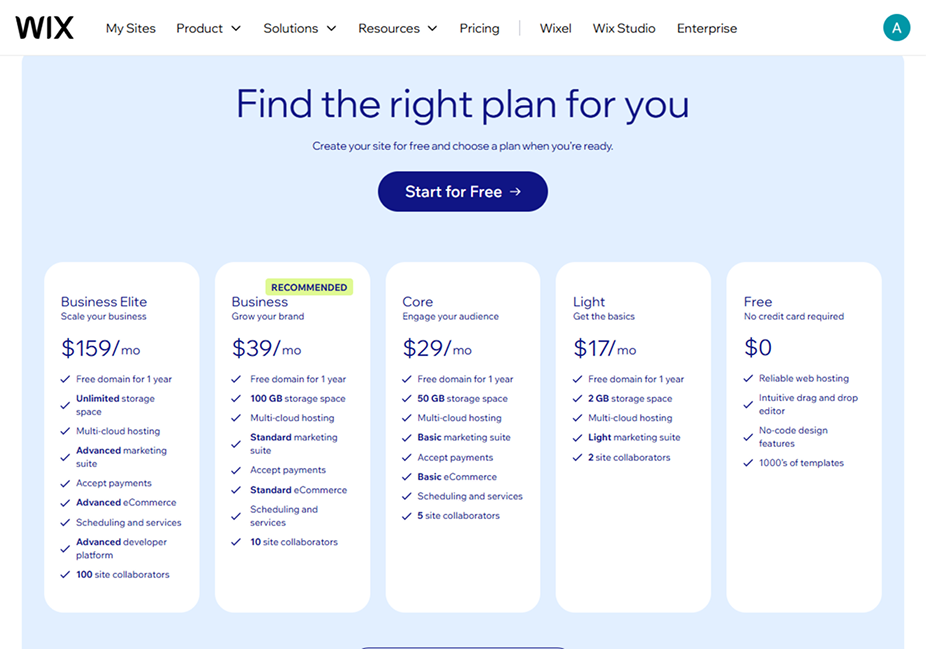
To sell online with Wix, you must subscribe to one of their paid plans that includes eCommerce—starting at $29/month with the Core plan. The Free and Light plans do not support online selling, so they’re off the table for merchants.
- Light: Around $17/month. Wix’s entry point, but website-only. You get a free domain for the first year, 2 GB storage, a basic (“Light”) marketing suite, and up to 2 site collaborators—but no eCommerce, so it’s for portfolios and simple sites, not stores.
- Core: Around $29/month. The true starting point for selling online. It includes Basic eCommerce, accept payments, a Basic marketing suite, 50 GB storage, scheduling and services, and up to 5 site collaborators—and lets you sell up to 50,000 products. Ideal for small businesses launching their first store.
- Business: Around $39/month. Wix’s recommended plan and the most popular choice for growing brands. It steps up to Standard eCommerce (abandoned cart recovery, selling on marketplaces, subscriptions, product reviews), a Standard marketing suite, 100 GB storage, and up to 10 site collaborators.
- Business Elite: Around $159/month. Provides Advanced eCommerce, an Advanced marketing suite, an advanced developer platform, unlimited storage, and up to 100 site collaborators. Suited for established, higher-volume retailers.
- Enterprise: Custom pricing for large-scale operations needing tailored solutions and dedicated support.
Additional Costs to Consider:
- Payment Processing Fees: Wix Payments charges standard industry rates (≈2.9% + $0.30 per transaction), with no additional Wix fee. Third-party gateways may differ.
- Domain Renewal: Free for the first year with annual plans, then renews yearly (~$10–$20 depending on TLD).
- Premium Apps: Many apps in the Wix App Market are free, but advanced tools or integrations may carry a separate monthly or annual fee.
Ease of Use
Most reviews call this Wix’s strongest suit, and for good reason. It’s the first thing you notice, and for getting a store live it holds up well. The platform gives you two ways in:
- Wix ADI (Artificial Design Intelligence): Answers a few questions, and ADI creates a personalized website for you in minutes, which you can then customize.
- Wix Editor: Provides full drag-and-drop control over every element on your page.
Store management (adding products, tracking orders, setting up payments) runs through a clear dashboard, and most tasks need no code. For a non-technical merchant launching a first store, that’s a genuine strength.
One thing worth sharing from our own experience: the editor isn’t always as intuitive or convenient as its reputation suggests, and as we built the store out and added more pages, the interface started to slow down. It’s smooth early on, and that’s when most people form their first impression, but once there’s a real catalog behind it, some tasks take more clicks than they should. Not a dealbreaker, just something to expect as your store grows.
Ecommerce Features
Wix offers a solid set of native Ecommerce features, especially with its Business & Ecommerce plans:
- Product Management: Add physical and digital products, create product variations (size, color), manage inventory, set product ribbons (e.g., “New Arrival,” “Sale”), and organize products into collections.
- Order Management: Track orders, manage fulfillment, print packing slips, and communicate with customers directly from the dashboard.
- Abandoned Cart Recovery: Automatically send emails to customers who added items to their cart but didn’t complete the purchase (available on higher-tier plans).
- Secure Online Payments: Accept payments through various gateways.
- Global Currencies: Display prices in multiple currencies.
- Subscriptions & Recurring Payments: Sell products or services on a subscription basis.
- Wix Bookings: If you sell services or appointments, Wix Bookings integrates well.
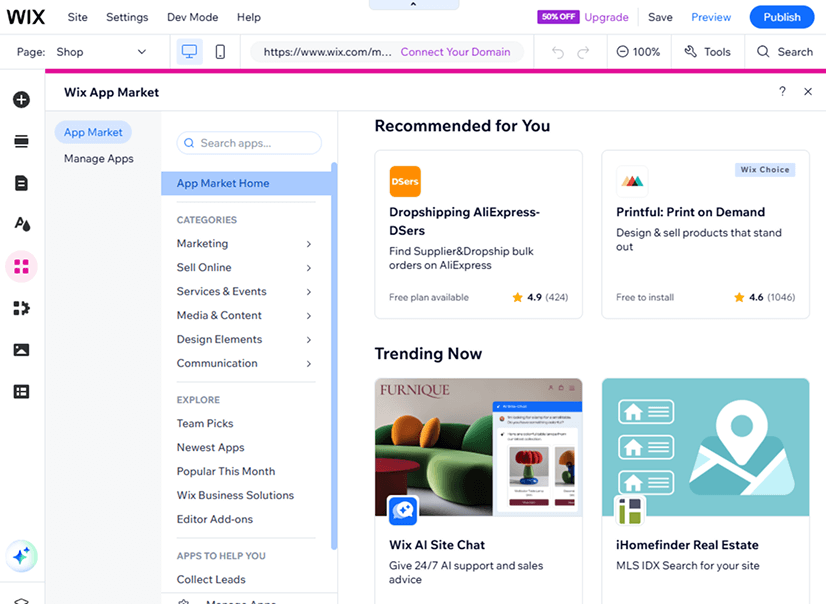
- Wix Stores App: Provides core store functionality, and you can extend it with other apps from the Wix App Market for features like loyalty programs, dropshipping integrations, and more.
Product Management
Effective product management is the backbone of any successful online store, and this is an area where Wix Ecommerce offers a robust and user-friendly experience. From the Wix Stores dashboard, merchants can efficiently handle all aspects of their product catalog.
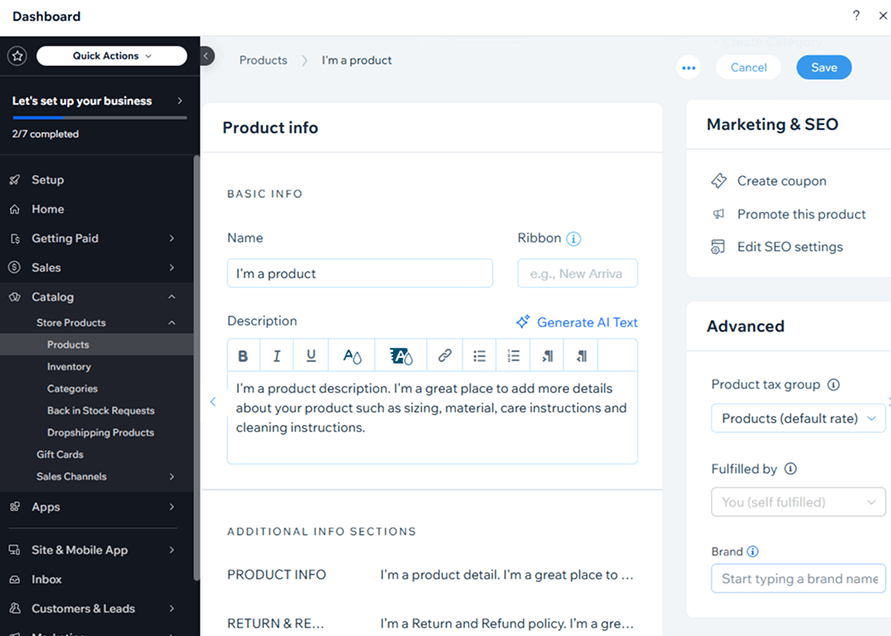
- Adding Products: Wix makes it straightforward to add both physical and digital products (like e-books, music, or software). The interface for adding product details is intuitive, guiding you through fields for product name, images/videos, detailed descriptions, and pricing.
- Product Variations & Options: You can easily create product variations for items that come in different sizes, colors, materials, or other attributes. Wix allows you to set unique SKUs, weights, and even manage separate inventory levels for each variant. You can also add custom text fields for personalized products.
- Inventory Tracking: Wix provides built-in inventory management tools. You can track stock quantities for each product and its variants. The system can be set to automatically hide out-of-stock items or display a “low stock” message, helping to prevent overselling and manage customer expectations.
- Product Organization: Organizing your products is simple with Collections (Wix’s term for categories). You can create unlimited collections to group similar items, making it easier for customers to navigate your store (e.g., “Summer Dresses,” “Men’s Shoes,” “Best Sellers”). Products can be assigned to multiple collections.
- Visual Merchandising: You can upload multiple high-quality images and videos for each product, allowing customers to get a comprehensive view. Wix offers some basic image editing tools, and the product page layouts are designed to showcase visuals effectively.
- Pricing & Promotions: Set regular prices, sale prices, and display the discount percentage. You can also create coupons and discount codes to offer promotions. For more advanced discount rules (like BOGO or tiered pricing), you might need to explore apps from the Wix App Market.
- Product Ribbons & Badges: Highlight specific products with customizable ribbons like “New Arrival,” “Sale,” “Bestseller,” or create your own custom text to draw attention.
- SKUs & Weight: Assign SKUs (Stock Keeping Units) for internal tracking and specify product weights, which is crucial for accurate shipping calculations.
Overall, Wix’s product management capabilities are comprehensive enough for most small to medium-sized businesses.
However, if your business goals demand advanced product management capabilities or a platform built for extensive customization and scalability, you might consider exploring alternatives like Magento or Shopify. To understand their differences, read the Magento vs Shopify comparison article.
Payment & Shipping
Payment Gateways: Wix offers its own payment processor, Wix Payments, which supports major credit/debit cards and other methods like Apple Pay and Klarna (depending on region). It also integrates with a wide range of third-party gateways, including PayPal, Stripe, and Square. With Wix Payments, Wix doesn’t charge its own transaction fees, but standard payment processor fees will still apply.
Shipping: You can set up custom shipping rules based on weight, price, or destination. Real-time carrier-calculated shipping is available for select carriers (often on higher plans or via apps). Wix also allows for local delivery and store pickup options. For more advanced shipping needs, integrations with apps like Shippo can expand capabilities.
Taxes: Automated tax calculations are available (e.g., Avalara for US sales tax), simplifying a complex aspect of Ecommerce.
Marketing & SEO Tools
As for Marketing and SEO Wix ecommerce review, the platform has invested significantly in improving its marketing and SEO capabilities:

- Wix SEO Wiz: An automated SEO setup checklist that analyzes your site and generates a personalized plan. It guides you through completing essential (often missing) basics like connecting to Google Search Console and optimizing meta tags and content.
- Customizable Meta Tags: Full control over page titles, descriptions, and URL slugs.
- Alt Text for Images: Easily add alt text to improve image SEO.
- Structured Data: Wix automatically adds some structured data markup for products, which can help with rich snippets in search results.
- Wix Email Marketing: Create and send email campaigns directly from your Wix dashboard.
- Social Media Integration: Tools to connect your store with social media platforms for promotions and direct sales (e.g., Facebook, Instagram).
- Blogging Platform: A built-in blog to create content and drive organic traffic.
- Analytics: Integrates with Google Analytics and offers its own Wix Analytics for tracking site performance and sales.
While these tools cover the essentials, advanced SEO professionals might still prefer platforms with more granular control or fewer historical SEO limitations.
If Wix is your platform, our Wix development services can get your SEO and performance set up properly. And if you’re outgrowing it, we also build on Shopify and Magento for more advanced needs.
Design & Templates
This is where Wix earns its reputation, and where our own experience matched the praise.
- Vast Template Library: Hundreds of modern, polished templates, many built specifically for online stores.
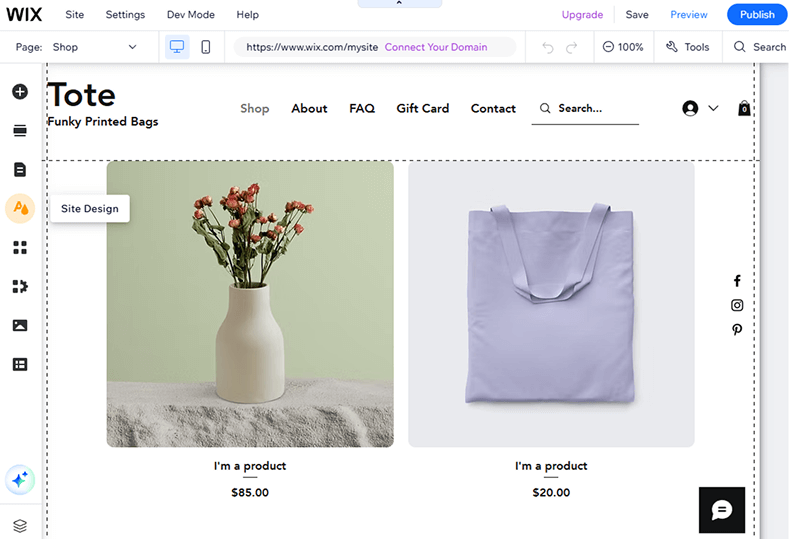
- Customization Freedom: The Wix Editor offers unparalleled drag-and-drop flexibility. You can move any element anywhere, resize it, and customize it extensively without touching code.
- Mobile Responsiveness: Templates are generally mobile-responsive, and Wix provides a separate mobile editor to fine-tune the mobile view.
A quick note on mobile. Wix does auto-generate a mobile version from your desktop site, so you’re not starting from zero. But in our experience it still needed a fair bit of manual refinement to look right, since the classic editor keeps mobile as a separate view you have to tune yourself. Either way, Squarespace still had the edge for us out of the box, since its templates are mobile-first and the phone view usually looks polished with no extra work. We covered that in our Squarespace for small business guide.
If the mobile tuning or custom design work sounds like more than you want to take on, that’s exactly the kind of thing our Wix development services handle, from mobile-first optimization to custom functionality that goes beyond the standard templates.
A note for agencies and designers: Beyond the standard Wix platform, there’s also Wix Studio—a separate offering built for agencies, freelancers, and designers managing multiple client sites. It adds responsive design tools, reusable assets, client handoff workflows, and team collaboration features. If you’re a solo merchant building your own store, the standard Wix editor is all you need; Wix Studio is aimed at professionals who build sites for others.
Summary
To summarize this Wix review for ecommerce:
Wix Ecommerce is a strong fit for small to medium businesses, solopreneurs, and visually-driven brands that want a good-looking store live fast without hiring a developer. The design flexibility genuinely impressed us. Just know the tradeoffs we hit firsthand: the editor slows as your catalog grows, mobile needs manual tuning, and it isn’t built for very large or complex stores.
- Best For: Startups, small to medium businesses, visually-driven brands, merchants needing an all-in-one solution with strong design capabilities.
- Key Strengths: Unmatched ease of use (drag-and-drop), stunning templates, comprehensive built-in features for typical Ecommerce needs, good app market.
- Potential Weaknesses: Template lock-in, an interface that can slow down as the store grows, mobile views that need some manual setup, and SEO control that advanced users may find limited.
Conclusion
So for a lot of merchants, especially those just starting or running small to medium stores, Wix is a smart choice. It lowers the barrier to a professional-looking, functional store, with strong design tools and attractive templates, as long as you’re comfortable with the tradeoffs we covered: some editor friction, manual mobile work, and limits at scale.
If you decide Wix is right but want it built properly from the start (custom design, clean mobile, SEO done correctly), our Wix development team can handle the build so you skip the trial-and-error we described above.
The best platform depends on your needs, technical comfort, and growth plans. If you expect heavy scaling, complex inventory, or the deepest SEO control, compare Wix closely against Shopify or Magento before committing.
Frequently Asked Questions (FAQ)
Is Wix good for Ecommerce?
Yes, for small to medium stores Wix is a solid choice. It offers a drag-and-drop builder, a wide range of ecommerce features, and strong templates.
How much does Wix Ecommerce cost?
Wix Ecommerce starts at $29/month (Core), which supports up to 50,000 products. The Business plan ($39/month) adds unlimited products and advanced tools like abandoned cart recovery and subscriptions, while Business Elite ($159/month) goes furthest with unlimited storage. The Free and Light ($17/month) plans don’t support online sales. (Prices are annual-billing rates.)
Which is better for Ecommerce: Shopify vs Wix?
Wix is ideal for beginners seeking an all-in-one, design-focused platform, while Shopify is better suited for growing or large ecommerce businesses with advanced selling needs. The right choice depends on your budget, scalability goals, and technical preferences.
What Templates Does Wix offer for Ecommerce?
Wix offers a wide range of ecommerce templates tailored to industries like fashion, electronics, and beauty. They’re fully customizable and give you a mobile-ready starting point, though the mobile view usually needs some manual tuning to look its best.
Do you need a developer to build a Wix store?
No, that’s the main appeal. Most merchants can launch a store themselves with the drag-and-drop editor. That said, custom design, clean mobile, and proper SEO setup are where a Wix development team saves you the trial-and-error, especially as your store grows.