5 Most Effective Ecommerce Social Proof Examples to Implement in 2026

Have you ever hesitated before buying online? We’ve all been there. To calm those doubts, we instinctively check reviews for reassurance. That’s the social proof example in action. It demonstrates real people’s experience of using a product or service. The thing is, we rely on the actions and decisions of others to navigate uncertainty, and that’s why social proof works well.
There are various forms of social proof, ranging from testimonials to user-generated content, but implementing such technologies can be challenging and confusing. To help you overcome any difficulties, we’ve prepared a guide that offers a clear way to use social proof effectively. Additionally, you will find five ecommerce social proof examples that give a clear understanding of its impact.
5 Proven Social Proof Examples to Implement in Ecommerce
Customer Product Reviews
Customer product reviews can help potential customers understand how other people have experienced a product, service, or brand. Online reviews also remain an important part of the research process: according to BrightLocal’s 2026 consumer research, consumers frequently use reviews alongside other sources when evaluating businesses, and 66% continue researching after reading positive reviews.
Therefore, it’s important to use real and authentic testimonials on the website. Using fake reviews can damage your reputation and threaten the brand’s integrity. Validating your testimonials highlights the value you provide.
Adding Product Reviews to Your Website
- Choose high-quality Reviews: You can find them in a blog comment section, on social media, or on Google reviews, or you can directly ask your clients for feedback, for example with automated review reminder emails. If you collect testimonials or reviews through third-party tools, make sure the solution follows current privacy requirements and handles customer data transparently. Review what information the tool collects, how it is stored, and whether customer consent is required for your particular setup.
- Create visuals: Customer product reviews come in various forms, including text-based formats, videos, and audio clips. Choose the one that best aligns with your preferences and ensure your reviews are branded to add credibility and validate reviews.
- Place appropriately: The position of reviews plays an important part. Opt for placing testimonials on the most visited pages: landing pages, product pages, or near call-to-action buttons. This will maximize their impact and influence on visitor behavior.
Get more reviews with Advanced Reviews & Reminders
- Automatically request reviews via email
- Mark reviews from verified buyers
- Display them in a widget on your Magento 2 product pages
Example of Successful Customer Product Reviews
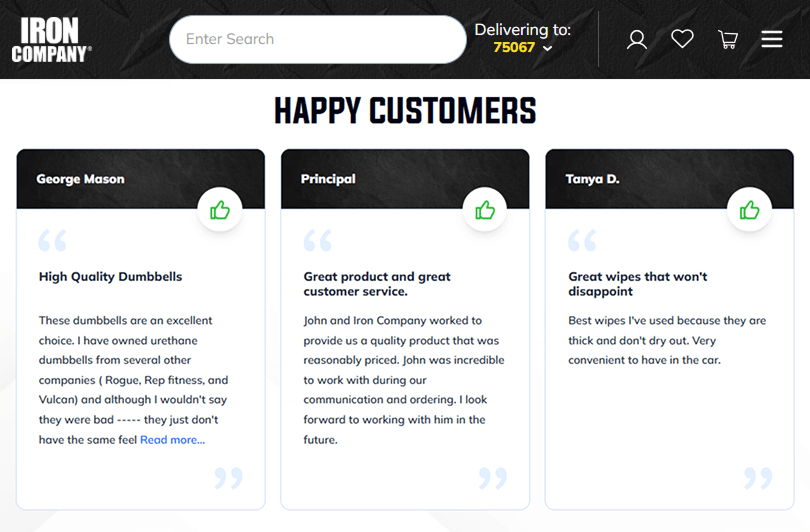
IRON COMPANY, an ecommerce retailer specializing in fitness equipment and flooring, provides a good example of using customer reviews as social proof. Its “Happy Customers” section features reviews from real customers describing their experience with specific products and customer service.
Instead of relying on generic claims about product quality, the testimonials highlight concrete experiences, such as product performance, service quality, and the ordering process. This helps potential customers see how other shoppers experienced the brand before making their own purchase decision.
Rich Snippets
Rich results can extend social proof beyond your ecommerce website and into search results. By adding eligible structured data to product pages, you can help search engines understand information such as product ratings, reviews, price, and availability. Google may then use this data to display a richer product result in Search.
Moreover, rich snippets are actually a time saver. They allow users to quickly assess your website without a need to visit it directly. Positive reviews and ratings build trust and influence potential customers. Rich results work as magnets for visitors, consequently boosting the click-through rate of your search results.
Adding Rich Snippets to Your Website
1. Identify content. Different websites need different types of rich snippets, so find the one that best suits your business:
- Reviews: This type of rich snippet showcases positive customer experiences directly in search results. It is suitable for websites featuring products, services, local businesses, or medical professionals.
- Products: Including rich snippets with product information like prices, availability, and even images can significantly enhance your search result appeal. This example of social proof is most suitable for ecommerce websites.
- Events: This is an ideal solution for local businesses because it displays event dates, locations, and even thumbnails.
- Recipes: Rich snippets can showcase enticing images, ingredients, and cooking times directly in search results.
- Local Businesses: Rich snippets can help local businesses increase their visibility. The organization snippet displays your contact information, operating hours, and customer ratings.
2. Add structured data markup. Next, add the appropriate structured data markup to help search engines understand your product information. For ecommerce product pages, this can include properties such as product details, offers, aggregate ratings, and reviews.
You can implement structured data manually or use a plugin, extension, or built-in ecommerce platform functionality. Whichever method you choose, validate the markup and make sure the information matches what visitors can see on the page.
As an alternative to manual implementation, you can use plugins or extensions. Many plugins are available for Content Management Systems (CMS) such as WordPress and for ecommerce platforms such as Magento 2, where a rich snippets extension can add product schema markup without manual coding. These plugins simplify the process by providing user-friendly interfaces and pre-built templates for various rich snippet types.
Turn product pages into rich search results with
Magento 2 Rich Snippets
Plumrocket Rich Snippets adds structured product data for ratings, reviews, price, availability, and other key details.
Example of Rich Snippets
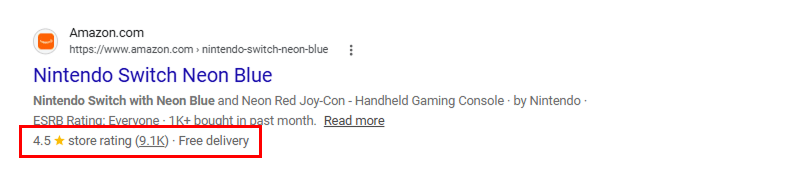
Here is an excellent example of rich snippets on Amazon. It shows product information such as the product name, ratings, price, and delivery information. The snippet includes an image that directly showcases the product and makes it stand out among other text snippets.
By providing more information about the product in snippets, you can significantly boost CTR and conversions on your website. Ratings and review counts can also act as social proof in ecommerce by showing that other customers have already purchased and reviewed the product.
Live Activity & Popularity Signals
Live activity and popularity signals show shoppers how other customers are interacting with a product in real time or over a recent period. These signals can include recent purchases, the number of people viewing or watching an item, products added to carts, or indicators that an item is trending, often shown as product badges.
In ecommerce, this type of social proof can reduce uncertainty by showing that other shoppers are actively interested in or purchasing the same product.
Adding Live Purchase Notifications to Your Website
There are two ways to add live purchase notifications: with a plugin or with custom coding.
Using a plugin. The simplest way to add live purchase notifications is by using a plugin. These plugins integrate with your existing ecommerce platform and handle the technical aspects of displaying notifications. Here’s how to add them:
- Choose a Plugin: Research and select a plugin that best suits your needs and budget. Popular options are TrustPulse, NotificationX, and FOMO by POWR.
- Installation and Configuration: For this stage of installing and configuring the plugin, follow instructions and connect it to your ecommerce platform.
- Customization: Customize notifications to your preference by changing the message, adding product details if you’d like, and enhancing the visual design.
- Trigger and Placement: Determine what triggers the notification and where you want them to appear on your website.
Custom coding. Although this approach requires some programming experience, it is worth the effort. Custom coding allows you to integrate live purchase alerts with maximum flexibility and personalization, which helps to bring all your ideas to life. If you’re not familiar with coding, you can hire experts to make the process smooth and hassle-free.
Highlight popular products in your Magento 2 store
Plumrocket Product Labels lets you add visual trust signals such as Best Seller, Trending, Top Rated, and Selling Fast badges.
Example of Live Activity & Popularity Signals
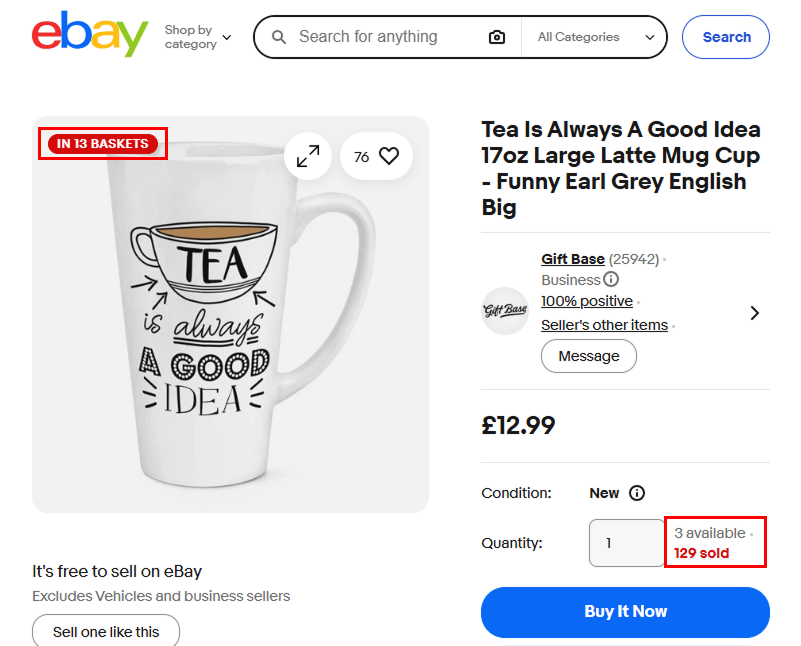
eBay uses several popularity signals directly on its product pages. In this example, shoppers can see that the product is already in multiple baskets, that dozens of people are watching it, and that more than 100 units have been sold. eBay also highlights the item as “trending.”
These signals provide immediate social proof by showing that other shoppers are actively considering or purchasing the same product. Instead of relying on a single notification, eBay combines several activity indicators to communicate product demand.
Client Logos & Partnerships
One more social proof example is client logos and partnerships. People tend to consider many factors when purchasing, and a company’s experience working with big companies matters. Potential customers are more likely to trust brands that they are familiar with. Client logos and partnerships work effectively on every type of website because they demonstrate credibility and expertise in catering to well-known clients.
How to Implement Client Logos & Partnerships
- Select Relevant Logos: Choose customers or partners that are recognizable or particularly relevant to your target audience. Before displaying another company’s logo, make sure you have the appropriate permission to use its brand assets and follow any applicable brand guidelines.
- Placement: The position of social proof is ideal on the website homepage, landing pages, marketing materials, and proposals. These are the pages that are most often visited, and they represent your brand and credibility. Make the most of them.
- Add Context (Optional): Even though logos are powerful visuals for ecommerce social proof, adding context can unlock even greater benefits. Case studies, for example, showcase the result of your previous collaboration with a prominent client while highlighting your skills and the collaborative nature of your work.
Example of Client Logos & Partnerships
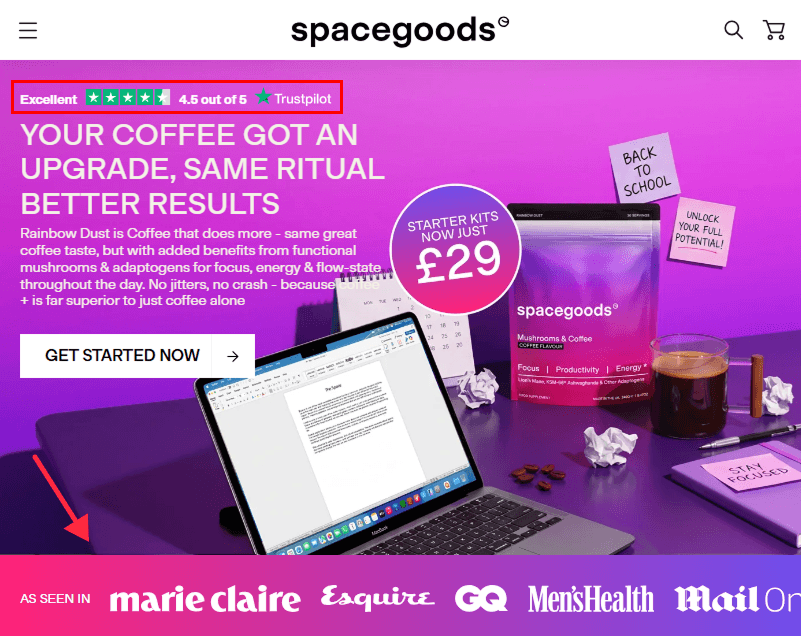
Spacegoods is a good ecommerce example of using brand mentions and third-party reviews as social proof. On its homepage, the brand highlights media logos such as Marie Claire, Esquire, GQ, and Men’s Health under an “As Seen In” section. These recognizable publications help reinforce credibility by showing that the brand has received external media attention.
Spacegoods also displays a Trustpilot review badge with a 4.5 out of 5 rating near the top of the page. While displaying a third-party review platform such as Trustpilot is not essential for every ecommerce store, it can provide an additional independent trust signal. Combining press mentions with an external review score gives shoppers multiple forms of social proof before they explore the product or make a purchase.
Add a Google seller rating badge to your Magento 2 store
Plumrocket Google Customer Reviews invites shoppers to rate their experience after checkout and displays your seller rating on a Google Reviews badge across your website.
User Generated Content
User-generated content (UGC) is another powerful form of social proof in ecommerce. It includes photos, videos, reviews, social media posts, and other content created by customers rather than by the brand itself.
Because UGC shows products in real-life situations, it can help potential customers understand how a product looks, works, or fits into everyday use. It also adds authenticity to the shopping experience by showing that real people are actively using and sharing their experience with the product.
How to Implement User Generated Content
- Encourage Customers to Share Content: Invite customers to post photos, videos, or reviews after purchasing a product. You can collect this content through review forms, post-purchase emails, social media hashtags, or dedicated UGC campaigns.
- Feature UGC on Your Website: Display customer photos and videos on product pages, landing pages, or dedicated galleries. This helps shoppers see the product in real-world contexts and adds an extra layer of trust beyond brand-created content.
- Ask for Permission: Before reusing customer-created content in marketing materials or on your website, make sure you have permission to publish it.
Advanced Reviews & Reminders lets customers attach photos and YouTube videos to their product reviews, and shows them in a review widget on product, category, and home pages.
Example of User-Generated Content
Javvy Coffee is a good ecommerce example of using user-generated video content as social proof. The brand features customer-style videos directly on its website, showing people talking about and using its products in a real-life setting.
This type of content helps potential customers see how the product fits into everyday use and provides a more authentic perspective than brand-created promotional content alone. By placing these videos close to a “Shop Now” call to action, Javvy connects social proof directly with the shopping journey.

Where to Place Social Proof in Your Ecommerce Store
Most stores already have social proof. The problem is where they put it: reviews buried in a tab below the specs, a Trustpilot badge in the footer, client logos on an About page nobody opens. Social proof works only when shoppers see it at the moment they hesitate. Where you place it matters as much as what it says.
Here’s where each type of proof works best.
1. Search results: before anyone visits your site
The first doubt shows up on Google. If your search result shows star ratings, a review count, price, and stock status, shoppers know that other people have bought from you before they even click. A plain blue link can’t do that.
Structured data makes this possible. On Magento 2, Plumrocket Rich Snippets adds the product markup for ratings, reviews, price, and availability, so you don’t need to code it by hand.
2. Category pages: help shoppers choose
On a grid of 40 similar products, shoppers scan instead of reading. A star rating under each thumbnail and a short label like Best Seller or Top Rated give them a reason to click one product over another.
Use one or two labels per product at most. If every item is a “Best Seller,” the label stops meaning anything. Product Labels lets you set these badges by rules, so they stay accurate as your bestsellers change.
Read more: Top Product Badge Examples in Ecommerce
3. Product page: right next to Add to Cart
The buying decision happens on the product page, so your strongest proof belongs there:
- Star rating and review count directly under the product name, linked to the full reviews.
- Two or three reviews that answer real objections: fit, build quality, delivery time. Pick reviews that answer the questions shoppers actually have, not just the most enthusiastic ones.
- Customer photos and videos next to your product shots. Real photos from buyers show things a studio photo can’t.
- Popularity signals like “Selling fast” near the price, where they support the urgency to buy.
- A short summary of what buyers actually say about fit, quality, or delivery. Shoppers read the top three reviews and guess the rest.
With 300 reviews, nobody reads them all. AI Review Manager turns them into a short summary of what customers like and what they complain about, shown right on the product page and updated automatically on your schedule.
The most common mistake is putting reviews in a tab at the bottom of the page. If shoppers have to search for them, many of them won’t find them.
4. Cart and checkout: reassure, don’t distract
At checkout, the question changes. Shoppers already believe the product is good. Now they want to know whether your store is safe and whether the order will actually arrive. Answer that with secure payment badges, your overall store rating, or one short review about fast delivery or easy returns.
Don’t add anything here that pulls shoppers away from checkout: no popups, no links to the review page. You’ve almost made the sale, so don’t give them a reason to leave.
5. Homepage and landing pages: build trust in the brand
First-time visitors don’t know you yet. This is where client and press logos, an aggregate rating from an independent platform, and a gallery of customer photos work best. Together they answer “Can I trust this store?” in a few seconds, the way Spacegoods does with its “As Seen In” section and Trustpilot score.
6. After the purchase: collect the next round of proof
The thank-you page and post-purchase emails are where new social proof comes from. Send the review request after the order has arrived, not on the day the customer placed it. Ask for photos as well as text. Every review you collect strengthens every placement listed above.
Read more: How to Customize Magento 2 Checkout Success Page
Advanced Reviews & Reminders sends review requests automatically and marks reviews from verified buyers, so you don’t have to chase customers manually.
Quick placement map
| Where | What the shopper is asking | Proof that works |
|---|---|---|
| Search results | “Is this worth clicking?” | Star ratings, review count, price |
| Category pages | “Which one do I pick?” | Ratings, Best Seller and Trending labels |
| Product page | “Is this product right for me?” | Reviews, customer photos, popularity signals |
| Cart and checkout | “Is this store safe?” | Trust badges, store rating, delivery reviews |
| Homepage | “Who are these people?” | Client logos, press mentions, UGC gallery |
| Post-purchase | (you ask the questions here) | Review requests, photo invites |
If you can only fix one placement this week, start with the product page. That’s where shoppers decide whether to buy. Moreover, we at Plumrocket have a range of product page improvement extensions that can help enhance your store.
Conclusions
Social proof can be a powerful way to build trust and help shoppers feel more confident when buying online. However, effective social proof in ecommerce is not simply about adding as many reviews, badges, or notifications as possible.
Customer product reviews, rich snippets, live activity and popularity signals, client logos and partnerships, and user-generated content can all influence how shoppers perceive a store. The right combination will depend on your products, audience, and customer journey.
Placement also matters. Reviews and ratings may be most useful close to a purchase decision, while press mentions, partnerships, and broader trust signals can help strengthen credibility earlier in the shopping experience.
Most importantly, keep your ecommerce social proof authentic, relevant, and easy to notice. Use real customer experiences and accurate information to support shoppers rather than overwhelm them. When implemented thoughtfully, social proof can become a natural part of the buying journey and strengthen long-term trust in your brand.
Frequently Asked Questions (FAQ)
What is social proof in ecommerce?
Social proof in ecommerce is any signal that shows shoppers other people have already bought, used, or recommended a product or store. Common examples include customer reviews, star ratings, popularity labels, client and press logos, and photos or videos from real customers.
What are the most effective types of social proof for online stores?
Customer product reviews, rich snippets, live activity and popularity signals, client logos and partnerships, and user-generated content are among the most widely used. The right mix depends on your products and audience, so it often makes sense to start with reviews and ratings and add other types over time.
Where should I place social proof on my ecommerce website?
Start with the product page, close to the price and the Add to Cart button, because that is where shoppers decide whether to buy. After that, add ratings to search results and category pages, trust signals to checkout, and brand-level proof such as press logos to the homepage.
How do I show review stars in Google search results for my Magento 2 store?
Add product structured data with ratings, reviews, price, and availability to your product pages. On Magento 2, the Rich Snippets extension adds this markup without manual coding. Keep in mind that Google decides whether to show a rich result, so valid markup makes your pages eligible but does not guarantee stars in search.
How can I get more product reviews in Magento 2?
Ask at the right moment. Send review requests after the order has arrived, keep the review form short, and invite customers to add photos. Advanced Reviews & Reminders automates this with up to three review reminder emails and marks reviews from verified buyers.
Do product badges like Best Seller work as social proof?
They do when they are accurate. Use one or two badges per product at most, because a badge on every item stops meaning anything. With Magento 2 Product Labels, you can assign badges by rules so they update as your bestsellers change.
![Ecommerce Product Badges: Examples from Top Retailers [2026]](https://plumrocket.com/blog/wp-content/webpc-passthru.php?src=https://plumrocket.com/blog/wp-content/uploads/2024/07/blog-post-ecommerce-product-badges-2.png&nocache=1)